


Activate your Deep Discovery Inspector license to connect to Network Security and integrate with Sandbox as a Service.
If you did not use a company-specific disk image to deploy the Deep Discovery Inspector
virtual appliance, you must activate your Deep Discovery Inspector license before
connecting to Network Security or integrating Sandbox as a Service.
Procedure
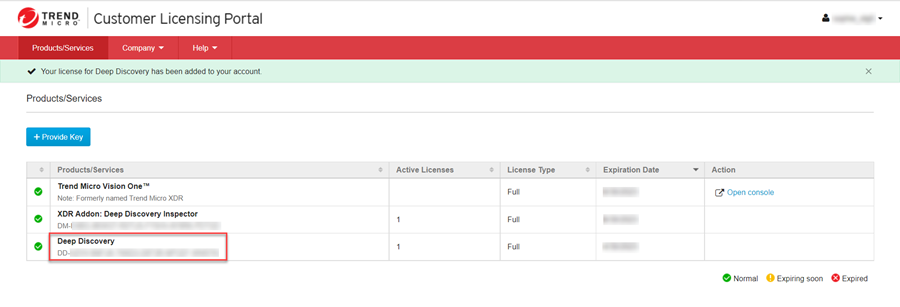
- Register Deep Discovery Inspector in the Customer Licensing Portal. For more information
see Managing Product/Service Licenses.
- Activate the Deep Discovery Inspector license:
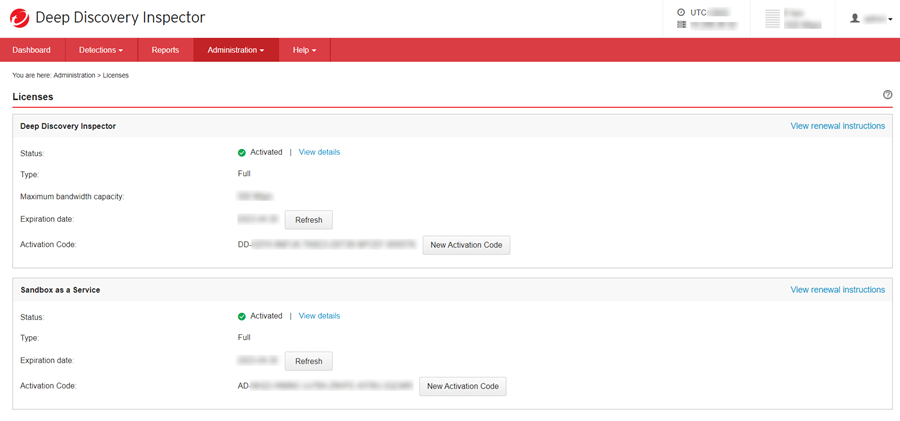
- In the Deep Discovery Inspector console, go to .
- Under Deep Discovery Inspector, click New Activation Code.
- Specify the Deep Discovery Inspector activation code available in the Customer Licensing
Portal, then click Save.
- Activate Sandbox as a Service in Deep Discovery Inspector.To obtain a license for Sandbox as a Service, contact your support provider.
- In the Deep Discovery Inspector console, go to .
- Under Sandbox as a Service, click New Activation Code.
- Specify the Sandbox as a Service activation code then click Save.
- Connect the Deep Discovery Inspector appliance.
-
To connect directly, see Connect a Deep Discovery Inspector appliance directly.
-
To connect using a Service Gateway as a proxy, see Connect a Deep Discovery Inspector appliance using Service Gateway as a proxy.
-