


|
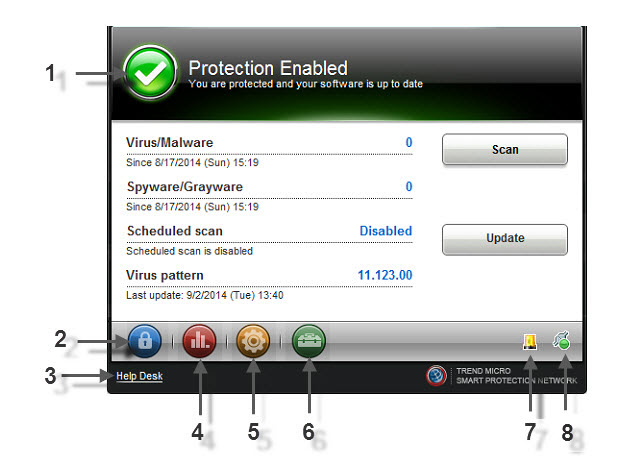
Number |
Element |
Details |
|---|---|---|
|
1 |
Displays information about the current state of the Security Agent and the client that it protects. |
|
|
2 |
Lock/Unlock |
Used to enable all features that may otherwise be restricted by the administrator. |
|
3 |
Link to help |
Serves as a link to an email address specified by the administrator for users to access if they have any technical issues. |
|
4 |
Logs |
Brings up relevant log information. |
|
5 |
Used to view and/or configure Security Agent settings. Note:
Administrators may deny access to this feature. |
|
|
6 |
User Tools |
Provides information on extra Internet security tools provided by Trend Micro. |
|
7 |
Outbreak Prevention icon |
Indicates that an outbreak may be in progress. |
|
8 |
Console Flyover |
Shows which features are connected/disconnected or active/inactive. |