


The Security Agent Console Flyover will open when hovering your mouse pointer over the small icon on the bottom right of the Security Agent console.
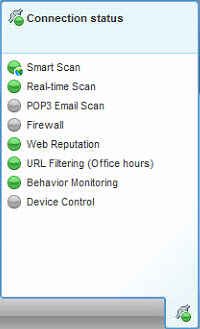
|
Feature |
Icon |
Meaning |
|---|---|---|
|
Connection |
|
Connected to the WFBS-Services Server |
|
|
Not connected to the WFBS-Services Server, but real-time scan is still running. The pattern file may not be up to date. Right-click the agent icon in the Windows Task Bar and click Update Now. |
|
|
Location |
|
In Office |
|
|
Out of Office |
|
|
Real Time Scan |
|
On |
|
|
Off |
|
|
Smart Scan |
|
Connected to the Scan Server |
|
|
Connected to Trend Micro Smart Protection Network |
|
|
|
Unable to connect to the Scan Server or Smart Protection Network; protection is reduced as Security Agents are unable to send scan queries. Note:
Verify that the Smart Scan service TMiCRCScanService is running and that Security Agents are connected to the WFBS-Services Server. |
|
|
|
Smart Scan is disabled. Using Conventional Scan |
|
|
|
On |
|
|
Off |


