


Use Endpoint Inventory to update your customers' endpoint agents from Worry-Free to TrendAI Vision One™ Endpoint Security.
 |
ImportantBefore you start the update process, review the following notes:
|
 Time: The agent update process might take up to 30 minutes to complete depending on the
number of agents, connection availability, and other factors within your customer's
environment. If this is your first time performing an update, allow an additional
20 to 40 minutes to provision Standard Endpoint Protection and migrate Worry-Free
group and policy settings.
Time: The agent update process might take up to 30 minutes to complete depending on the
number of agents, connection availability, and other factors within your customer's
environment. If this is your first time performing an update, allow an additional
20 to 40 minutes to provision Standard Endpoint Protection and migrate Worry-Free
group and policy settings.You can use Endpoint Inventory in your TrendAI Vision One™ for Service Providers console to automatically update selected customer endpoints from the Worry-Free agent
to the TrendAI Vision One™ Endpoint Security agent with Standard Endpoint Protection features. The process allows
you to update one customer's endpoints at a time.
After the update process completes, verify your customers' security policies and that
endpoints are able to connect with TrendAI Vision One™.
Procedure
- In the TrendAI Vision One™ for Service Providers console, go to and click the target customer to update.

Note
You can only update endpoints from one customer at a time. - If this is your first time updating Worry-Free agents for this customer, create the
Standard Endpoint Protection instance and choose whether to migrate group and policy
settings.
- Select one or two Worry-Free agents and click Update Worry-Free agent.
- When prompted, confirm the information about updating agents and click Accept.The Create Standard Endpoint Protection instance window appears.
- Specify a unique Display name.
- Select the region.
- Specify a description for the instance.
- Click Create.Your customer's TrendAI Vision One™ console creates the Standard Endpoint Protection instance. The task might take up to 20 minutes to complete depending on your customer's environment. While the instance provisions, you cannot update Worry-Free agents.
- Configure migration for Worry-Free group and policy settings.The first time you update a customer's agents, the Migrate Worry-Free group and policy settings window appears. You can choose to migrate the default group and policy settings to TrendAI Vision One™ Endpoint Security Policies, or skip the migration.
- Select one or two Worry-Free agents and click Update Worry-Free agent.
- When prompted, confirm the information about updating agents and click Accept.
- In the Migrate Worry-Free group and policy settings window, choose how to manage group and policy migration.
-
Migrate group and policy settings from Worry-Free to TrendAI Vision One™ and apply to Protection Manager: Migrates the default group and policy settings. Migrating group and policy settings takes about 20 minutes to complete. You will not be prompted again for this customer.
-
Skip this time and use existing group and policy settings from TrendAI Vision One™: The selected endpoints update to Standard Endpoint Protection and apply the Default Assignment in TrendAI Vision One™ Endpoint Security Policies.
-
Skip migration and do not show again: Endpoints you choose to update to Standard Endpoint Protection for this customer all apply the Default Assignment in TrendAI Vision One™ Endpoint Security Policies. You will not be prompted again for this customer.
Note
If you choose to skip this time, the Migrate Worry-Free group and policy settings prompt appears the next time you select endpoints to update for this customer.After migration finishes, TrendAI™ recommends reviewing the task status and downloading the policy migration report to check for any missing or failed configuration migration.-
If the task is successfully completed, all data which can be migrated was successfully transferred. Some Worry-Free data, such as URL types, cannot be migrated to TrendAI Vision One™.
-
If the task is successful, but partially completed, review the report to see what data failed to migrate to TrendAI Vision One™.
-
If the task failed, review the error message to troubleshoot any issues.
After reviewing the migration report, TrendAI™ recommends modifying the policy settings in your customer's TrendAI Vision One™ console to include any date or settings that did not migrate. To modify your customer's policies, go to . -
- Update your customer's Worry-Free agents.
- Select the endpoints you want to update.
Note
You can select up to a maximum of 200 endpoints to update at a time. - Click Update Worry-Free agent.The Update Worry-Free agent window appears.
- Select the Endpoint group to assign the endpoints after updating.You must select a different group for Windows and macOS endpoints. If your selection includes endpoints with both operating systems, you must choose a group for each. If you only select endpoints with one operating system, you only need to choose one group.
Note
If you migrated the policy settings, the endpoint groups created by the migration are automatically selected by default.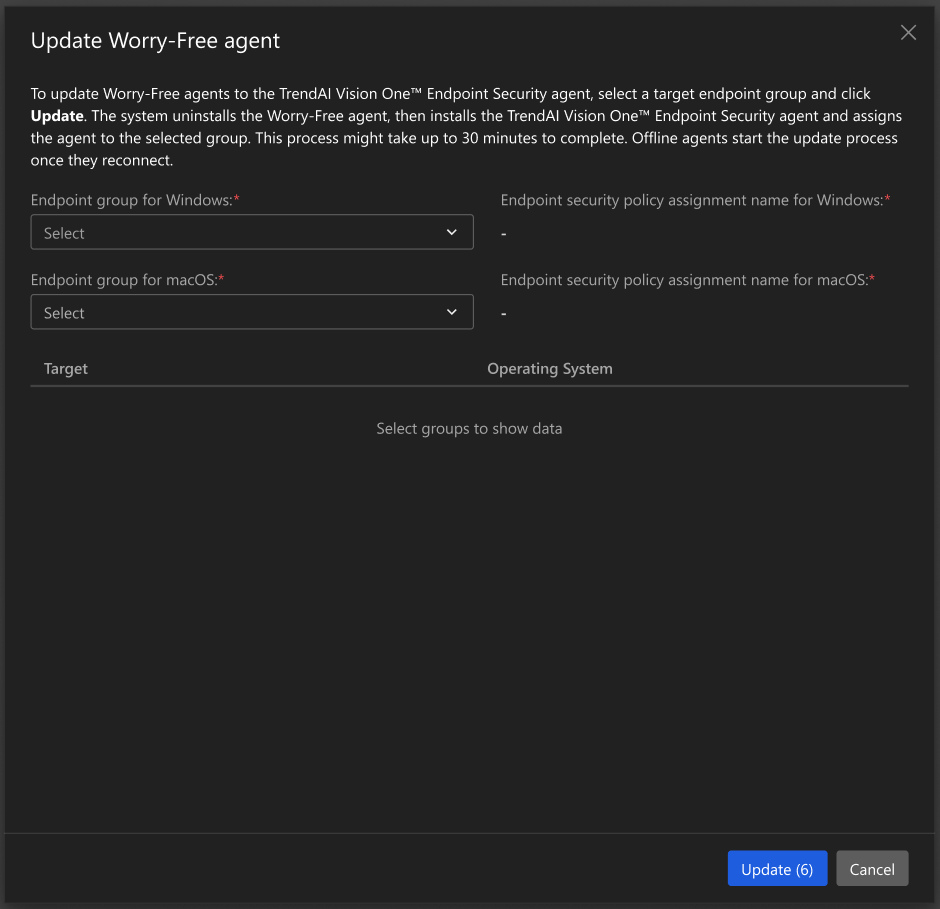
Select a group for Windows and macOS agents 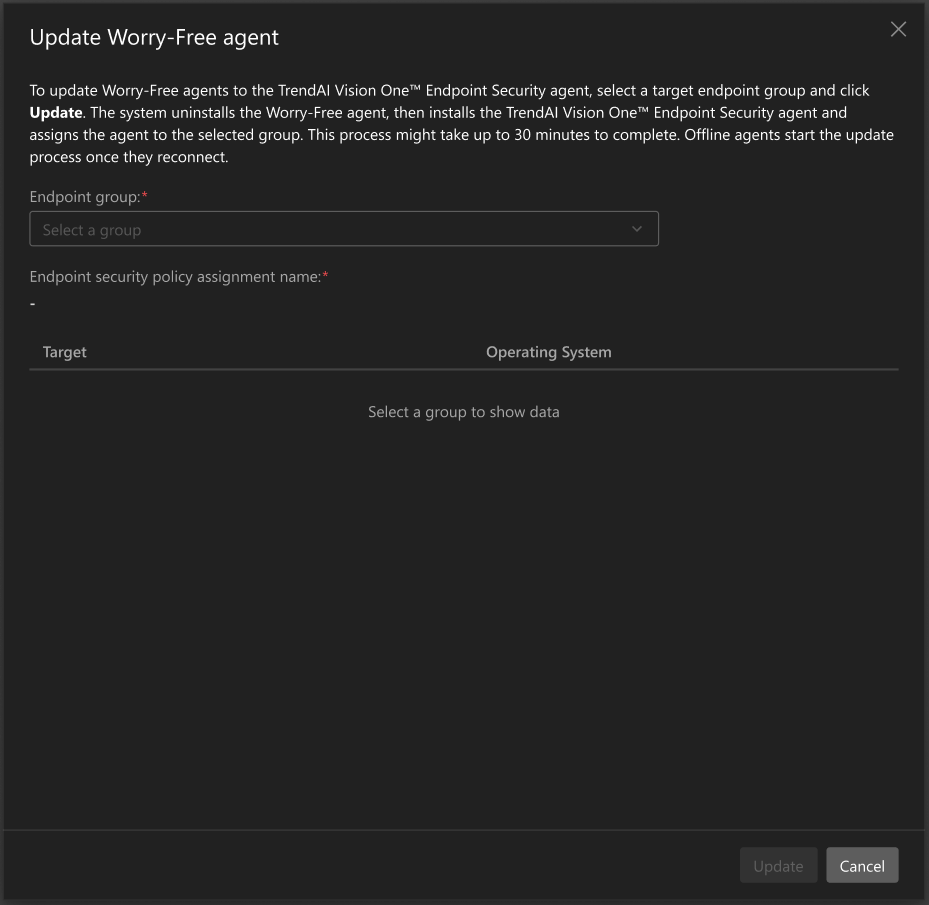
Select a group for agents with the same OS Selecting a group displays the Endpoint security policy assignment name and populates the list of selected agents. - Review the list of selected agents for compatibility.Any agent that is not supported or compatible displays a caution icon (
 ). These agents are unable to update and will not run the update task.
 - After reviewing, click Update.TrendAI Vision One™ for Service Providers creates the update task and sends the request to all connected endpoints. Allow up to 30 minutes for the update task to complete. Disconnected agents start the task as soon as they reconnect.Updated agents display the Standard Endpoint Protection instance you selected.
- Select the endpoints you want to update.
- After the update task finishes, review your customer's endpoints to ensure they are able to connect and have the correct policy assignments.