
Running Instances Parent topic

The Running Instances page displays active agents and allows you to act on pending encryption key requests.
SecureCloud considers an agent active when it continues to send heartbeat response to the server. Active agents are listed as running instances. Otherwise, an instance will be removed from the list if the heartbeat response is missing.
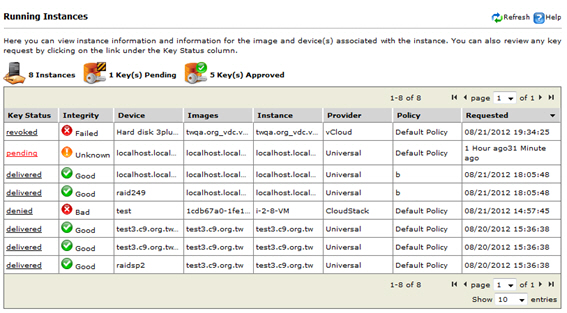
running_instances.jpg

Sample Running Instance page

The Running Instances page displays the following information as it evaluates each item per instance session:
Note
Note
You can schedule when SecureCloud can evaluate an instance against policy rules. See Integrity Checking for details.
icon_instances.jpgInstances
Indicates the number of active instances.
ic_keys_pending.jpgKey(s) Pending
Indicates the number of pending approval for a machine image to decrypt data on a device. If the Key Status is Pending, then you can manually grant this approval.
ic_keys_approved.jpgKey(s) Approved
Indicates the number of manually or automatically approved key requests.
Key Status
The following values denote the status for each key requests:
  • Pending—a request waiting for manual approval if it either met or failed to meet the conditions defined by the policy. See for details.
  • Approved—a request was approved manually or automatically. It is now associated with and meets the conditions of a policy. SecureCloud permits the instance to access the device.
  • Delivered—SecureCloud has delivered the key to the running agent service. This status cannot be reversed. On the agent system, the target encrypted drive is mounted and ready for use.
  • Denied—instance fails to meet the criteria specified by the device policy rules, then SecureCloud denies device access to the requesting instance.
    Alternatively, the key request is manually denied (even if the instance satisfies the criteria set in a policy). When the policy action is set to Manual approval, an administrator can deny certain key requests.
  • Revoking—SecureCloud revokes an encryption key, which provides an opportunity to make the instance compliant with the policy rules and obtain back the encryption key. You can automatically set this behavior by scheduling an integrity check. Refer to Integrity Checking for details.
  • Revoked—SecureCloud disables the key request, which makes the encrypted drive inaccessible.
Integrity Status
SecureCloud checks the integrity of security products within a machine instance. Refer to Integrity Status for details.
Device
Device ID of the active instance. See the Devices page for information on all devices associated with your account.
Image
Image ID of the active instance. See the Images page for information on all images associated with your account.
Instance
Instance ID
Provider The instance/agent platform—can be the name of the cloud provider (for example, Amazon-EC2) or Universal for local Windows or Linux system. See Agent Requirements for the list of supported agent platforms.
Policy
Associated policy for the active instance. This depends on the last matching policy made during the most recent evaluation/integrity check.
Requested
The date and time when this instance became active.
For each instance, you can learn what is the associated data storage device or devices being used to store the secure data.