


將滑鼠游標移到 Security Agent 主控台右下方的小圖示上時,Security Agent 主控台浮動視窗即會開啟。
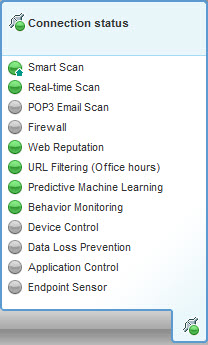
功能 |
圖示 |
意義 |
|---|---|---|
連線 |
|
已連線至 Worry-Free Business Security Services 伺服器 |
|
|
未連線至 Worry-Free Business Security Services 伺服器,但即時掃瞄仍在執行。病毒碼檔案可能不是最新的。在 Windows 工作列上的用戶端圖示上請點選右鍵,然後請點選「立即更新」。 |
|
雲端截毒掃瞄 |
|
已連線至掃瞄伺服器 |
|
|
已連線至趨勢科技主動式雲端截毒技術 |
|
|
|
無法連線至掃瞄伺服器或主動式雲端截毒技術;由於 Security Agent 無法傳送掃瞄查詢,因此保護已減少。 註:
請確認雲端截毒掃瞄服務 TMiCRCScanService 正在執行,並且 Security Agent 已連線至 Worry-Free Business Security Services 伺服器。 |
|
|
|
「雲端截毒掃瞄」已關閉。正在使用「標準掃瞄」 |
|
|
Application Control |
|
開啟 |
|
|
鎖定進行中:Application Control 正在掃瞄端點,以建立完整的應用程式資產清單。 |
|
|
|
鎖定:只有在上次資產清單掃瞄期間安裝的應用程式,或管理員新增至「允許」規則的應用程式可執行 |
|
|
|
關閉 |
|
|
其他所有功能 |
|
開啟 |
|
|
關閉 |


