您已離線。這是該頁面的唯讀版本。
Search
Support
For Home
For Business
English
Bahasa Indonesia (Indonesian)
Dansk (Danish)
Deutsch (German)
English (Australia)
English (US)
Español (Spanish)
Français (French)
Français Canadien
(Canadian French)
Italiano (Italian)
Nederlands (Dutch)
Norsk (Norwegian)
Polski (Polish)
Português - Brasil
(Portuguese - Brazil)
Português - Portugal
(Portuguese - Portugal)
Svenska (Swedish)
ภาษาไทย (Thai)
Tiếng Việt (Vietnamese)
Türkçe (Turkish)
Čeština (Czech)
Ελληνικά (Greek)
Български (Bulgarian)
Русский (Russian)
עברית (Hebrew)
اللغة العربية (Arabic)
日本語 (Japanese)
简体中文
(Simplified Chinese)
繁體中文
(Traditional Chinese)
繁體中文 HK
(Traditional Chinese)
한국어 (Korean)
Cancel
Home
線上說明中心
apex-central-patch-10-install-help-specifying-the-insta
Print
指定安裝位置
檢視次數:
步驟
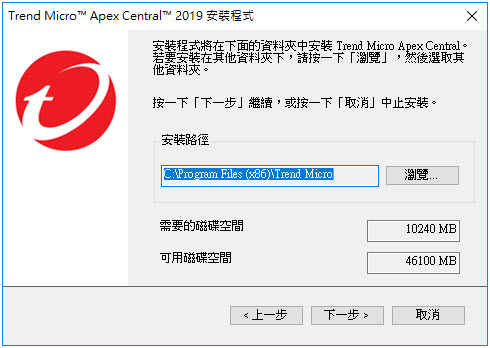
按「下一步」。
會出現「
選取目標資料夾
」畫面。
選取目標資料夾
指定
Trend Micro Apex Central
檔案的位置。按一下「
瀏覽
」指定其他位置。
注意
在 64 位元作業系統上,預設位置為
C:\Program Files (x86)\Trend Micro
。
安裝程式會在
Program Files
資料夾內的預先確定資料夾中,安裝
Trend Micro Apex Central
通訊 (MCP) 的相關檔案。
Table of Contents
The page you're looking for can't be found or is under maintenance
Try again later or go back to the previous page
Go back
Inaccurate information
Too complex or confusing
Translation issue
Functionality issue
Other
Table of Contents