


我可以在哪裡找到有關 Trend Micro Apex One™ as a Service 的最新資訊?
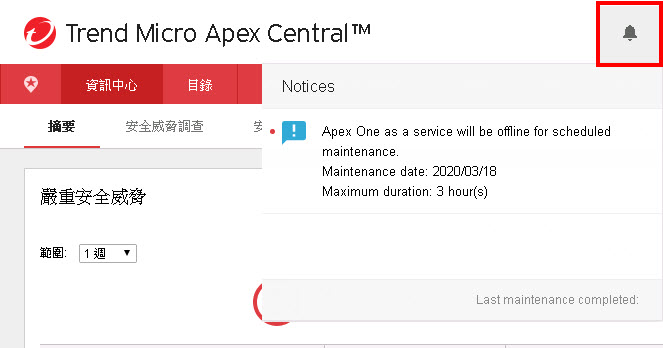
Trend Micro Apex One™ as a Service 會定期發佈有關即將舉行的活動、新興威脅、產品更新等新聞。
您可以按一下 Trend Micro Apex Central Web 主控台右上方的鈴鐺圖示,以存取新聞摘要。
我可以將哪些檔案和資料夾從掃瞄中排除?
趨勢科技建議將特定檔案和資料夾從掃瞄中排除,以避免發生效能或功能問題。
若要進行掃瞄例外設定,請移至。
 |
注意列出的檔案和資料夾指的是相關產品的預設安裝位置。如果您使用自訂安裝位置安裝產品,請據此變更對應的目錄。
|
AutoDesk Inventor/AutoCAD
-
C:\Program Files\Autodesk\Inventor 2013\Bin\Inventor.exe -
C:\Program Files\Autodesk\Vault Professional 201\Explorer\Connectivity.VaultPro.exe -
C:\Program Files\Autodesk\AutoCAD 2013\acad.exe -
C:\Program Files\Autodesk\Inventor Fusion 2013\Inventor Fusion.exe -
C:\Program Files\Autodesk\DWG TrueView 2013\dwgviewr.exe -
C:\Program Files (x86)\Autodesk\Autodesk Design Review 2013\DesignReview.exe -
C:\Program Files\Autodesk\Product Design Suite 2013\Bin\ProductDesignSuite.exe
Cisco AnyConnect VPN
-
C:\Program Files (x86)\cisco\cisco anyconnect vpn client\vpnagent.exe -
C:\Program Files (x86)\cisco\cisco anyconnect vpn client\vpnui.exe
Citrix 產品
將下列副檔名從掃瞄中排除:
-
.LOG -
.DAT -
.TMP -
.POL -
.PF
|
注意依預設,Deep Security 會排除下列程序:
C:\Windows\System32\winlogon.exe您不需要再將此程序新增至「處理影像」例外。
|
IBM Domino 資料目錄
IBM Domino 資料目錄儲存了 Domino 電子郵件。趨勢科技建議將 Domino 資料目錄從掃瞄中排除,因為這個目錄會定期使用新郵件更新,所以,重複掃瞄這個資料夾可能不具效率。
未分割安裝的預設 Domino 資料目錄如下:
\lotus\domino\dataFSLogix 資料檔容器
檔案目錄:
-
C:\Program Files\FSLogix*
檔案:
-
server*.vhdx(檔案伺服器) -
[example.com]*.vhdx(DFS 命名空間) -
L:*.vhdx(檔案伺服器上的本機磁碟機) -
C:\Windows\Temp*.vhdx
|
注意排除的檔案或目錄可能會因環境不同而異,具體取決於 UNC 路徑和對應的磁碟機。
|
Microsoft Active Directory 網域控制站
-
C:\WINNT\SYSVOL -
C:\WINNT\NTDS -
C:\WINNT\ntfrs -
C:\WINNT\system32\dhcp -
C:\WINNT\system32\dns
Microsoft Exchange Server
趨勢科技建議排除儲存 Microsoft Exchange 信箱的目錄或分割區。
為了防止 Exchange Information Store 遭到損毀,您必須排除掃瞄可安裝的檔案系統 (IFS)
M: 磁碟。Microsoft Internet Information Services (IIS) 7.0
趨勢科技建議排除儲存在預設 IIS 記錄檔目錄中的 Web 伺服器記錄檔:
C:\inetpub\logs\*.logOracle 資料庫
將下列副檔名從掃瞄中排除:
-
.DBF -
.LOG -
.RDO -
.ARC -
.CTL
SAP 產品
-
SAP ABAP 或 Java 安裝:
\usr\sap\ -
SAP Content Server 安裝:
\SAPDB\
檔案:
-
SAP Print Server:
SAPSprint.exe -
安裝 SAPgui 的伺服器:
lsagent.exe
|
注意趨勢科技建議在 SAP 升級和安裝期間排除基底 SAPinst 目錄和子目錄:
C:\Program Files\SAPinst_instdir\ |
Symantec Backup Exec
-
C:\Program Files\Symantec\Backup Exec\beremote.exe -
C:\Program Files\Symantec\Backup Exec\beserver.exe -
C:\Program Files\Symantec\Backup Exec\bengine.exe -
C:\Program Files\Symantec\Backup Exec\benetns.exe -
C:\Program Files\Symantec\Backup Exec\pvlsvr.exe -
C:\Program Files\Symantec\Backup Exec\BkUpexec.exe
System Center Configuration Manager (SCCM)
SCCM 2012 Manager:
-
%windir%\Windows\TEMP\BootImages\(開機映像) -
%windir%\ConfigMgr_OfflineImageServicing\*(OS 映像)
SCCM 2012 端點防護:
-
檔案目錄:
-
%programfiles%\Microsoft Configuration Manager\Inboxes\*.* -
%programfiles(x86)%\Microsoft Configuration Manager\Inboxes\*.*
-
-
檔案路徑:
-
%allusersprofile%\NTUser.pol -
%systemroot%\system32\GroupPolicy\registry.pol -
%windir%\Security\database\*.chk -
%windir%\Security\database\*.edb -
%windir%\Security\database\*.jrs -
%windir%\Security\database\*.log -
%windir%\Security\database\*.sdb -
%windir%\SoftwareDistribution\Datastore\Datastore.edb -
%windir%\SoftwareDistribution\Datastore\Logs\edb.chk -
%windir%\SoftwareDistribution\Datastore\Logs\edb*.log -
%windir%\SoftwareDistribution\Datastore\Logs\Edbres00001.jrs -
%windir%\SoftwareDistribution\Datastore\Logs\Edbres00002.jrs -
%windir%\SoftwareDistribution\Datastore\Logs\Res1.log -
%windir%\SoftwareDistribution\Datastore\Logs\Res2.log -
%windir%\SoftwareDistribution\Datastore\Logs\tmp.edb
-
System Center Operations Manager (SCOM)
檔案目錄:
-
Operations Manager 2007 和 Operations Manager 2007 R2:
%programfiles%\System Center Operations Manager\<version>\Health Service State對於 Operations Manager 2007 或 Operations Manager 2007 R2,預留位置「<version>」表示「2007」。Operations Manager 2012:-
%programfiles%\System Center Operations Manager\<component>\Health Service State對於 Operations Manager 2012,預留位置「<component>」表示「用戶端」或「伺服器」。
-
-
Operations Manager 2012 R2(管理伺服器):
%programfiles%\Microsoft System Center 2012 R2\Operations Manager\Server\Health Service State -
Operations Manager 2012 R2(閘道伺服器):
%programfiles%\System Center Operations Manager\Gateway\Health Service State -
Operations Manager 2012 R2(用戶端):
%programfiles%\Microsoft Monitoring Agent\Agent\Health Service State
副檔名:
-
SQL 資料庫伺服器:建議的例外項目包括 Operations Manager 元件使用的 SQL Server 資料庫檔案,以及用於主要資料庫和 tempdb 資料庫的系統資料庫檔案。例如:
-
.MDF -
.LDF
-
-
Operations Manager(伺服器、閘道和用戶端):建議的例外項目包括 Operations Manager 使用的佇列和記錄檔。例如:
-
.EDB -
.CHK -
.LOG
-
VMware
在掃瞄期間嘗試存取 VMware 磁碟分割區時,可能會影響作業階段載入效能,以及與虛擬機器互動的能力。有鑑於此,趨勢科技建議您排除大型一般檔案和設計的檔案(例如 VMware 磁碟分割區)。
您可以排除含有虛擬機器的目錄或排除
.VMDK 和 .VMEM 副檔名,藉此排除虛擬機器。如何將 DNS 名稱和 IP 位址新增至例外清單?
基於安全理由,許多組織都使用例外清單,來限制內部網路僅能存取核准的通訊來源。由於 Apex One as a Service 伺服器依賴 Internet 來管理端點上的
Security Agent,因此您可能需要將 Apex One DNS 名稱和 IP 位址新增至防火牆或閘道例外清單,以確保您的端點持續受到保護。
連接埠
Apex One as a Service 伺服器使用下列通訊埠:
-
Apex One:TCP 443
-
Apex One (Mac):TCP 8443
DNS
趨勢科技建議將 DNS 名稱新增至例外清單,以便可以根據 DNS 動態核准 IP 子網路。
您可以在 Trend Micro Apex Central Web 主控台(「」)的「產品伺服器」畫面找到註冊的Apex One DNS 名稱。
IP 位址
由於 Apex One as a Service 位於 Microsoft Azure Cloud,所以 Apex One as a Service 伺服器不會使用單一
IP 位址或一組 IP 位址。
目前,Apex One as a Service 位於 Azure Cloud 的數個地區中。Microsoft 在以下位置提供了資料中心 IP 範圍清單:
|
注意將 IP 位址新增至例外清單時,您必須匯入下列地區名稱:
|
URL
|
注意
|
下列 URL 必須可供端點 Security Agent 使用:
-
主動式更新:
https://osce14-p.activeupdate.trendmicro.com/activeupdate -
全球雲端截毒掃瞄伺服器:
https://osce14.icrc.trendmicro.com/tmcss -
授權伺服器:
http://licenseupdate.trendmicro.com/ollu/license_update.aspx -
主機資料湖:
xdr-nabu-prod.etdl.trendmicro.com -
PR 意見反應伺服器:
https://licenseupdate.trendmicro.com/fb/bifconnect.ashx -
網頁分級伺服器
-
osce14-0-en.url.trendmicro.com -
osce14-0-jp.url.trendmicro.com -
osce14-0-tc.url.trendmicro.com -
osce14-0-de.url.trendmicro.com -
osce14-0-fr.url.trendmicro.com -
osce14-0-sp.url.trendmicro.com -
osce14-0-ru.url.trendmicro.com -
osce14-0-it.url.trendmicro.com -
osce14-0-po.url.trendmicro.com -
osce14-0-kr.url.trendmicro.com
-
-
Smart Feedback:
-
osce140-de.fbs25.trendmicro.com -
osce140-en.fbs25.trendmicro.com -
osce140-es.fbs25.trendmicro.com -
osce140-fr.fbs25.trendmicro.com -
osce140-jp.fbs25.trendmicro.com -
osce140-pl.fbs25.trendmicro.com -
osce140-it.fbs25.trendmicro.com -
osce140-ru.fbs25.trendmicro.com -
osce140-tc.fbs25.trendmicro.com -
osce140-kr.fbs25.trendmicro.com
-
-
近距離無線通訊 (NFC) 伺服器:
-
osce14-en.gfrbridge.trendmicro.com -
osce14-jp.gfrbridge.trendmicro.com -
osce14-tc.gfrbridge.trendmicro.com -
osce14-kr.gfrbridge.trendmicro.com -
osce14-de.gfrbridge.trendmicro.com -
osce14-fr.gfrbridge.trendmicro.com -
osce14-it.gfrbridge.trendmicro.com -
osce14-es.gfrbridge.trendmicro.com -
osce14-ru.gfrbridge.trendmicro.com -
osce14-po.gfrbridge.trendmicro.com
-
-
Census 伺服器:
-
https://osce14-en-census.trendmicro.com -
https://osce14-de-census.trendmicro.com -
https://osce14-fr-census.trendmicro.com -
https://osce14-es-census.trendmicro.com -
https://osce14-it-census.trendmicro.com -
https://osce14-pl-census.trendmicro.com -
https://osce14-ru-census.trendmicro.com -
https://osce14-jp-census.trendmicro.com -
https://osce14-kr-census.trendmicro.com -
https://osce14-tc-census.trendmicro.com
-
-
Census 伺服器(備份):
-
osce14bak-en-census.trendmicro.com -
osce14bak-de-census.trendmicro.com -
osce14bak-es-census.trendmicro.com -
osce14bak-fr-census.trendmicro.com -
osce14bak-it-census.trendmicro.com -
osce14bak-jp-census.trendmicro.com -
osce14bak-kr-census.trendmicro.com -
osce14bak-pl-census.trendmicro.com -
osce14bak-ru-census.trendmicro.com -
osce14bak-sc-census.trendmicro.com -
osce14bak-tc-census.trendmicro.com
-
-
Machine Learning(檔案)
-
osce140-en-f.trx.trendmicro.com -
osce140-de-f.trx.trendmicro.com -
osce140-es-f.trx.trendmicro.com -
osce140-fr-f.trx.trendmicro.com -
osce140-it-f.trx.trendmicro.com -
osce140-jp-f.trx.trendmicro.com -
osce140-kr-f.trx.trendmicro.com -
osce140-pl-f.trx.trendmicro.com -
osce140-ru-f.trx.trendmicro.com -
osce140-tc-f.trx.trendmicro.com
-
-
Machine Learning(行為)
-
osce140-en-b.trx.trendmicro.com -
osce140-de-b.trx.trendmicro.com -
osce140-es-b.trx.trendmicro.com -
osce140-fr-b.trx.trendmicro.com -
osce140-it-b.trx.trendmicro.com -
osce140-jp-b.trx.trendmicro.com -
osce140-kr-b.trx.trendmicro.com -
osce140-pl-b.trx.trendmicro.com -
osce140-ru-b.trx.trendmicro.com -
osce140-tc-b.trx.trendmicro.com
-
-
Machine Learning(共存模式)
-
oscecmp140-de-f.trx.trendmicro.com -
oscecmp140-en-f.trx.trendmicro.com -
oscecmp140-es-f.trx.trendmicro.com -
oscecmp140-fr-f.trx.trendmicro.com -
oscecmp140-it-f.trx.trendmicro.com -
oscecmp140-jp-f.trx.trendmicro.com -
oscecmp140-kr-f.trx.trendmicro.com -
oscecmp140-pl-f.trx.trendmicro.com -
oscecmp140-ru-f.trx.trendmicro.com -
oscecmp140-tc-f.trx.trendmicro.com
-
我如何將 Apex One as a Service 的記錄檔傳送到第三方 SIEM 解決方案呢?
Apex Central 允許您將來自 Apex One as a Service 的 Syslog 訊息轉送到第三方安全資訊與事件管理 (SIEM) 解決方案。
 |
重要在 Apex Central 上啟動 Syslog 轉送功能之前,請確認您的 SIEM 解決方案已預設設定並且正在執行 Syslog 輸入/接收器服務。
如需具體的 SIEM 組態設定,請參閱您的 SIEM 伺服器文件。
|
若要在 Apex Central 上設定 Syslog 轉送,請移至,然後在「Syslog 設定」畫面上提供下列 SIEM 伺服器資訊:
-
伺服器位址:提供接收轉送 Syslog 之 SIEM 伺服器的 IP 位址或主機名稱
-
通訊埠:提供 SIEM 伺服器上的通訊埠號碼。
注意
-
對於 TCP/UDP 通訊,預設通訊埠號碼通常為 514。
-
而對於 TLS 通訊,預設通訊埠號碼通常為 6514。
-
-
通訊協定:選取 SIEM 伺服器使用的通訊方法
Apex One as a Service 策略部署的運作方式
Trend Micro Apex Central 會將策略部署到 Apex One 伺服器。
如需有關 Apex One as a Service 策略部署程序和部署觸發條件的詳細資訊,請參閱以下文章: