オフライン状態です。これはページの読み取り専用バージョンです。
Search
Support
For Home
For Business
English
Bahasa Indonesia (Indonesian)
Dansk (Danish)
Deutsch (German)
English (Australia)
English (US)
Español (Spanish)
Français (French)
Français Canadien
(Canadian French)
Italiano (Italian)
Nederlands (Dutch)
Norsk (Norwegian)
Polski (Polish)
Português - Brasil
(Portuguese - Brazil)
Português - Portugal
(Portuguese - Portugal)
Svenska (Swedish)
ภาษาไทย (Thai)
Tiếng Việt (Vietnamese)
Türkçe (Turkish)
Čeština (Czech)
Ελληνικά (Greek)
Български (Bulgarian)
Русский (Russian)
עברית (Hebrew)
اللغة العربية (Arabic)
日本語 (Japanese)
简体中文
(Simplified Chinese)
繁體中文
(Traditional Chinese)
繁體中文 HK
(Traditional Chinese)
한국어 (Korean)
Cancel
Home
オンラインヘルプセンター
trend-micro-remote-manager-updating-worry-free-
Print
ウイルスバスター ビジネスセキュリティエージェントのアップデート
ビュー:
手順
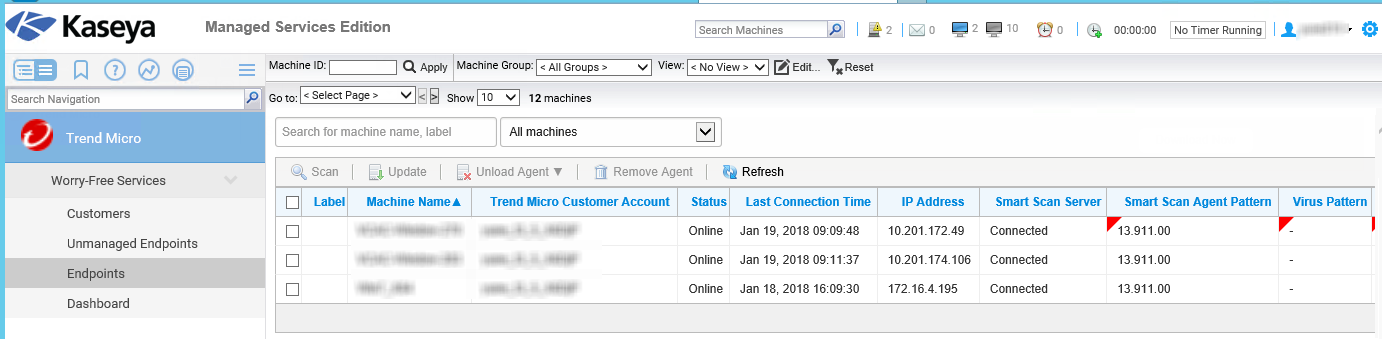
Kaseya VSA Webコンソールを開き、
[Trend Micro]
→
[Worry-Free Services]
→
[Endpoints]
の順に移動します。
次の画面が表示されます:
ドロップダウンリストを使用して、エンドポイントをフィルタします。
All Security Agents
Online
Offline
Outdated agents
Unloaded agents
アップデートするエンドポイントの横にあるチェックボックスをオンにして、
[Update]
をクリックします。
確認画面が表示されます。
[Update]
をクリックします。
Table of Contents
The page you're looking for can't be found or is under maintenance
Try again later or go back to the previous page
Go back
Inaccurate information
Too complex or confusing
Translation issue
Functionality issue
Other
Table of Contents