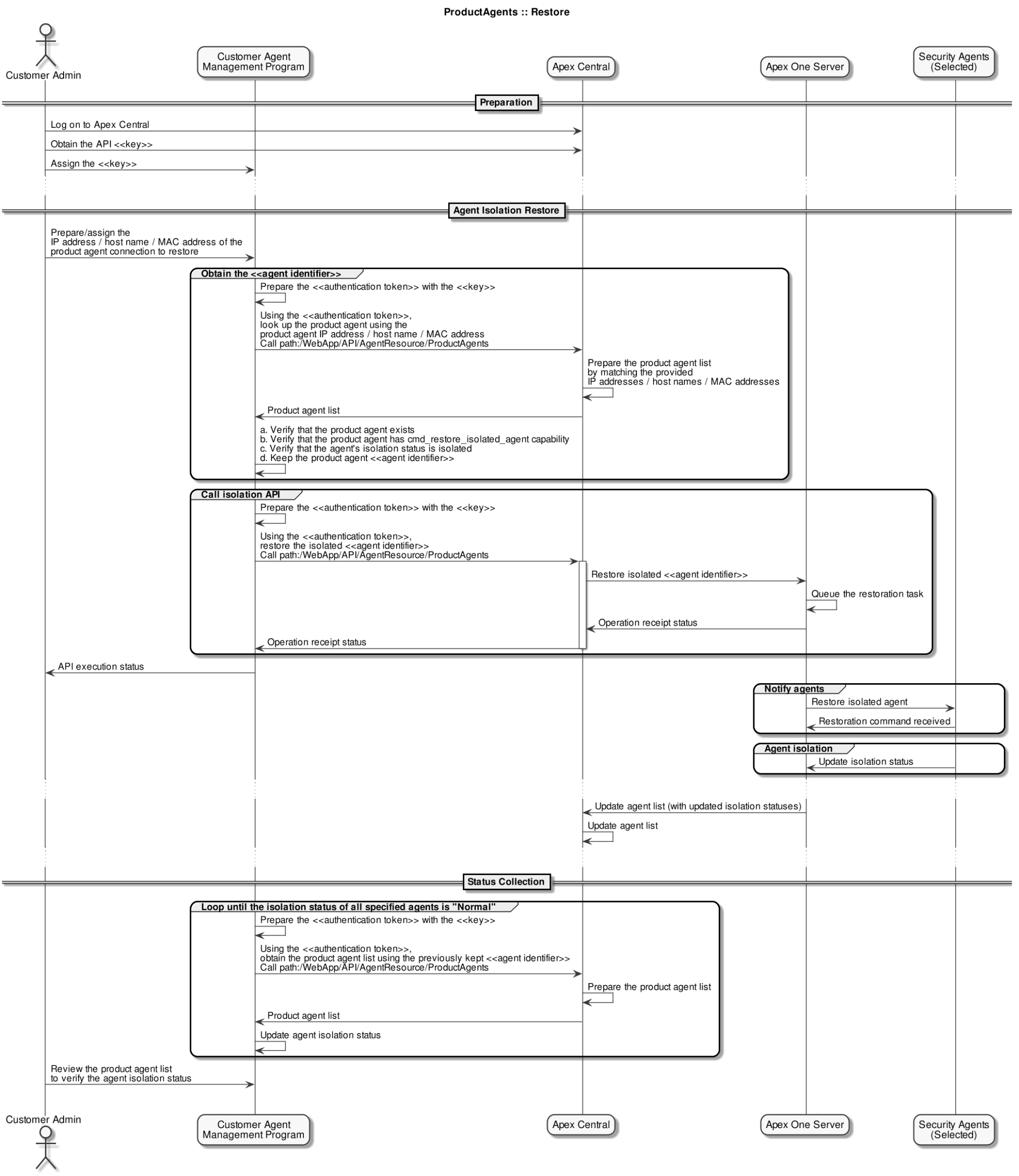
To restore an isolated agent connection to the network, specify the act value as cmd_restore_isolated_agent in the HTTP request body.
HTTP Request
POST /WebApp/API/AgentResource/ProductAgents
Parameters
The HTTP request body must contain all required parameters.
|
Name |
Type |
Description |
|---|---|---|
|
Required Parameters |
||
|
act |
String |
Specify the value as cmd_restore_isolated_agent. |
|
allow_multiple_match |
String |
Specify one of the following:
Important:
If this parameter is set to False, and the provided parameters match multiple agents, the action will be unsuccessful. |
|
Optional Parameters |
||
|
entity_id |
String |
The GUID of the managed product agent Use to identify the agent(s) on which the action is performed. |
|
ip_address |
String |
The IP address of the managed product agent Use to identify the agent(s) on which the action is performed. |
|
mac_address |
String |
The MAC address of the managed product agent Use to identify the agent(s) on which the action is performed. |
|
host_name |
String |
The endpoint name of the managed product agent Use to identify the agent(s) on which the action is performed. |
|
product |
String |
The Trend Micro product on the server instance Use to identify the agent(s) on which the action is performed. For supported values, see Automation API Product Values. |
HTTP Request Example
POST /WebApp/API/AgentResource/ProductAgents
HTTP Request Body
Specify a JSON object containing the following:
-
HTTP header:
Field Name
Value
Authorization
Bearer [Generated JWT authentication token]
-
Request body:
{
  "entity_id":"8a1a84550462-40bc9afc-3770-16ac-cd6c",
  "act":"cmd_restore_isolated_agent",
  "allow_multiple_match":false
  }
Response
If successful, this method returns an HTTP status code of "200" and a response body with a result code of "1" and the following structure:
{
 "result_code":1,
 "result_description":"Operation successful",
 "result_content":[
   {
     "entity_id":"8a1a84550462-40bc9afc-3770-16ac-cd6c",
     "product":"SLF_PRODUCT_OFFICESCAN_CE",
     "managing_server_id":
        "026332F39EBC-41C19604-02DD-2C5F-EDE5",
     "ad_domain":"",
     "folder_path":"Workgroup",
     "ip_address_list":"192.168.121.132",
     "mac_address_list":"00-0C-29-9B-AB-65",
     "host_name":"OSCECLIENT",
     "isolation_status":"isolated",
     "capabilities":[
        "cmd_uninstall_agent",
        "cmd_relocate_agent",
        "cmd_isolate_agent",
        "cmd_restore_isolated_agent"
      ]
    }
  ]
}
Where the result_content object contains a list of agents that matched all of the specified parameters before the action ("act") was applied:
|
Name |
Type |
Description |
|---|---|---|
|
entity_id |
String |
The GUID of the managed product agent |
|
product |
String |
The Trend Micro product that the agent is for For available values, see Automation API Product Values. |
|
managing_server_id |
String |
The GUID of the product server that manages the agent |
|
ad_domain |
String |
The Active Directory domain that the agent belongs to (if applicable) |
|
folder_path |
String |
The folder path of where the agent is located on tthe managing server (for example, the Apex One domain that the agent is listed under) |
|
ip_address_list |
String |
Lists the IP addresses on the agent endpoint |
|
mac_address_list |
String |
Lists the MAC addresses on the agent endpoint |
|
host_name |
String |
The endpoint name of the managed product agent |
|
isolation_status |
String |
Indicates the agent isolation status (if applicable). For available values, see Automation API Isolation Statuses. |
|
capabilities |
String |
Lists the API actions that can be performed on the agent For available values, see Automation API Actions/Capabilities. |
For more information about API responses and descriptions of response codes, see the following topics:
API Sequence Diagram