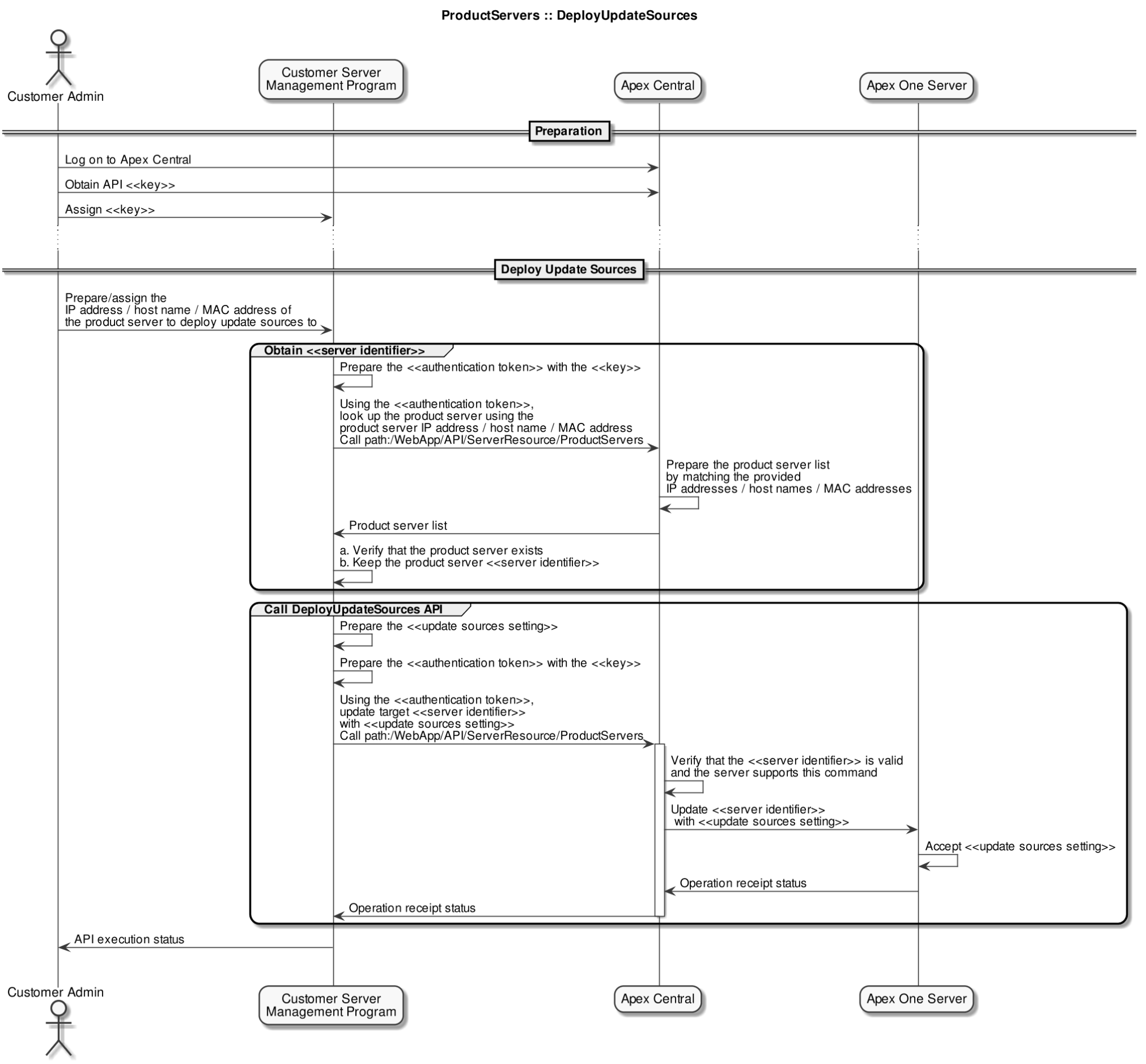
Deploys update sources for Update Agents to the Apex One server.
-
To use the standard update source (updating from the Apex One server), set the AllowUpdateFromOtherAU value to 0.
-
To deploy customized update sources, set the AllowUpdateFromOtherAU value to 1.
HTTP Request
POST /WebApp/API/ServerResource/ProductServers
Parameters
The HTTP request body must contain all required parameters.
|
Name |
Type |
Description |
|---|---|---|
|
Required Parameters |
||
|
entity_id |
String |
The GUID of the managed product server Use to indicate the server on which to perform the action |
|
act |
String |
Specify the value as cmd_deploy_update_sources |
|
setting_data_JSON_string |
String |
The JSON string containing the update source settings to deploy:
|
|
AllowUpdateFromOtherAU |
String |
|
|
UpdateComponentFromServerIfOUSFailed |
String |
|
|
UpdateSettingFromServerIfOUSFailed |
String |
|
|
UpdateProgramFromServerIfOUSFailed |
String |
|
|
OUSList |
String |
The customized update source list containing the following keys:
|
|
OUSSettingType |
String |
Indicates the customized update source data type
|
|
OUSSettingJSONString |
String |
Indicates a JSON format string containing the update source settings |
HTTP Request Example
POST /WebApp/API/ServerResource/ProductServers
HTTP Request Body
Specify a JSON object containing the following:
-
HTTP header:
Field Name
Value
Authorization
Bearer [Generated JWT authentication token]
-
Request body:
{
  "entity_id":"58694B6C13DD-41C9A0F1-23E8-BFC9-7EAC",
  "act":"cmd_deploy_update_sources",
  "setting_data_JSON_string":
    "{
      "AllowUpdateFromOtherAU":1,
      "UpdateComponentFromServerIfOUSFailed":1,
      "UpdateSettingFromServerIfOUSFailed":1,
      "UpdateProgramFromServerIfOUSFailed":1,
      "OUSList":[
        {
          "OUSSettingType":"IPv4",
          "OUSSettingJSONString":" {
            "FromIP":"192.168.1.1",
            "ToIP":"192.168.1.255",
            "OUS":"http://192.168.183.141:21112
              /activeupdate"}"
        },
        {
          "OUSSettingType":"IPv6",
          "OUSSettingJSONString":"{
            "Prefix":"fec0:0:0:12::",
            "Length":128,
            "OUS":"http://192.168.183.141:21112
              /activeupdate"}"
        },
        {
          "OUSSettingType":"OUSIni",
          "OUSSettingJSONString":"{
            "OusIniString":"192.168.183.1,
              192.168.183.255,,http://192.168.183.141:21112
              /activeupdate"}"
        }
      ]
    }"
  }
Response
If successful, this method returns an HTTP status code of "200" and a response body with a result code of "1" and the following structure:
{
 "result_code":1
 "result_description":"Operation successful"
 "result_content":[
    {
     "entity_id":"026332F39EBC-41C19604-02DD-2C5F-EDE5",
     "product":"SLF_PRODUCT_OFFICESCAN_CE",
     "ad_domain":"",
     "ip_address_list":
        "192.168.121.131,fe80::8846:d1ac:8ee1:85ce",
     "host_name":"OSCESERVER"
     "capabilities":[
        "cmd_deploy_update_sources"
        ]
    }
  ]
}
Where the result_content object contains a list of servers that match all of the specified parameters:
|
Name |
Type |
Description |
|---|---|---|
|
entity_id |
String |
The GUID of the managed product server |
|
product |
String |
The Trend Micro product on the server instance For available values, see Automation API Product Values. |
|
ad_domain |
String |
The Active Directory domain that the server belongs to (if applicable) |
|
ip_address_list |
String |
The IP address list on the server |
|
host_name |
String |
The host name of the server |
|
capabilities |
String |
Lists the API actions that can be performed on the server For available values, see Automation API Actions/Capabilities. |
For more information about API responses and descriptions of response codes, see the following topics:
API Sequence Diagram