


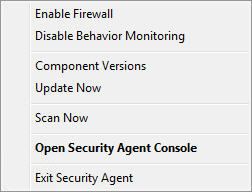
Shortcuts to tasks that users perform frequently are available when right-clicking the Security Agent icon in the Windows Task Bar.
|
Task |
Details |
|---|---|
|
Enable Firewall |
Available only if the WFBS-SVC administrator granted you the privilege to configure the Firewall For details, see Configuring the Firewall. |
|
Enable Behavior Monitoring |
Available only if the WFBS-SVC administrator granted you the privilege to configure Behavior Monitoring For details, see Configuring Behavior Monitoring Settings. |
|
Component Versions |
View the following information:
|
|
Update Now |
Run a manual update if components are out-of-date For details, see Running a Manual Update. |
|
Scan Now |
Run a manual scan to check for security risks For details, see Running a Manual Scan. |
Open Worry-Free Business Security Services |
Open the Security Agent main console |
Exit Worry-Free Business Security Services |
Available only if the WFBS-SVC administrator granted you the privilege to unload the Security Agent. Type the administrator password, if required, and click OK. Warning:
Unloading the Security Agent disables all security features and leaves the client unprotected. |