


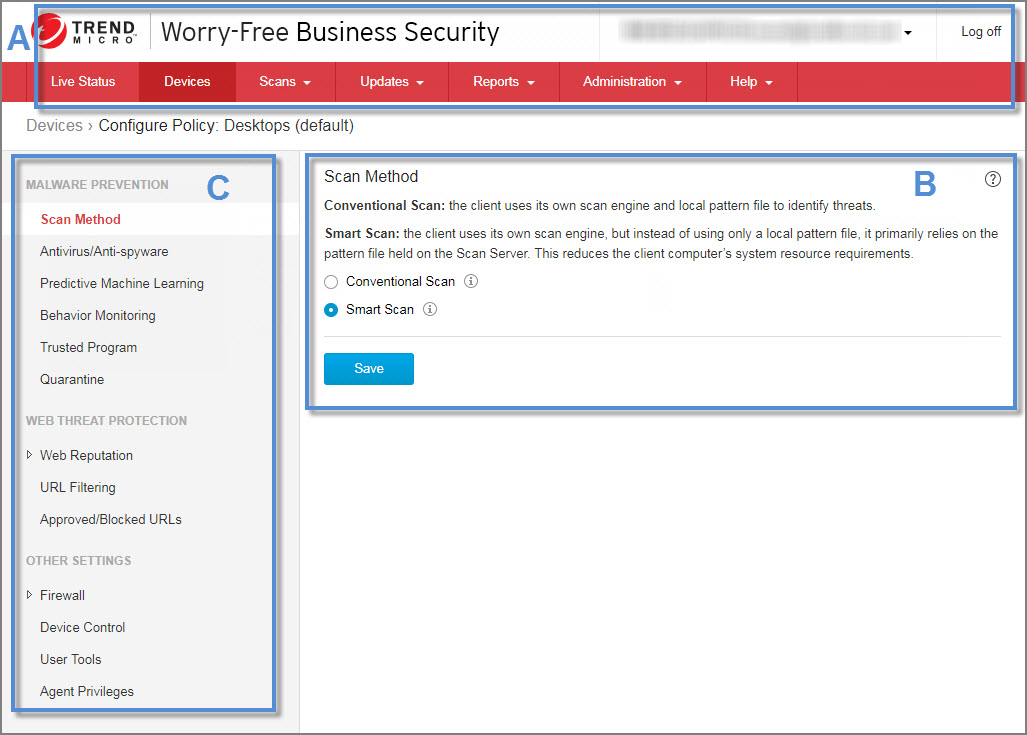
The web console contains the following main sections:
| Section | Description |
|---|---|
|
A. Main menu |
At the top of the web console is the main menu. The Log off link is also provided to allow you to end your current session. |
| B. Configuration area |
Below the main menu items is the configuration area. Use this area to select options and configure settings according to the menu item you selected. |
| C. Menu sidebar (not available on all screens) |
When you choose a Security Agent group from the Devices screen and click Configure Policy, a menu sidebar displays. Use the sidebar to configure security settings and scans for the desktops and servers that belong to the group. When you choose a Messaging Security Agent from the Devices screen (Advanced only), you can use the sidebar to configure security settings and scans for your Microsoft Exchange servers. |
|
Menu Item |
Description |
|---|---|
|
Live Status |
Monitor the overall security status of your Security Agents and the operational status of the Security Server |
|
Devices |
|
|
Scans |
|
|
Updates |
|
|
Reports |
Generate reports to keep track of threats and other security-related events |
|
Administration |
|
|
Help |
|