


TrendAI Vision One™™ - File Security SDK lets you to scan files using free software development kits (SDKs)
or a command line interface (CLI). The SDK and CLI scanner stack scans all incoming
files for known malware and active content. File Security SDK can send notifications
and quarantine malware.
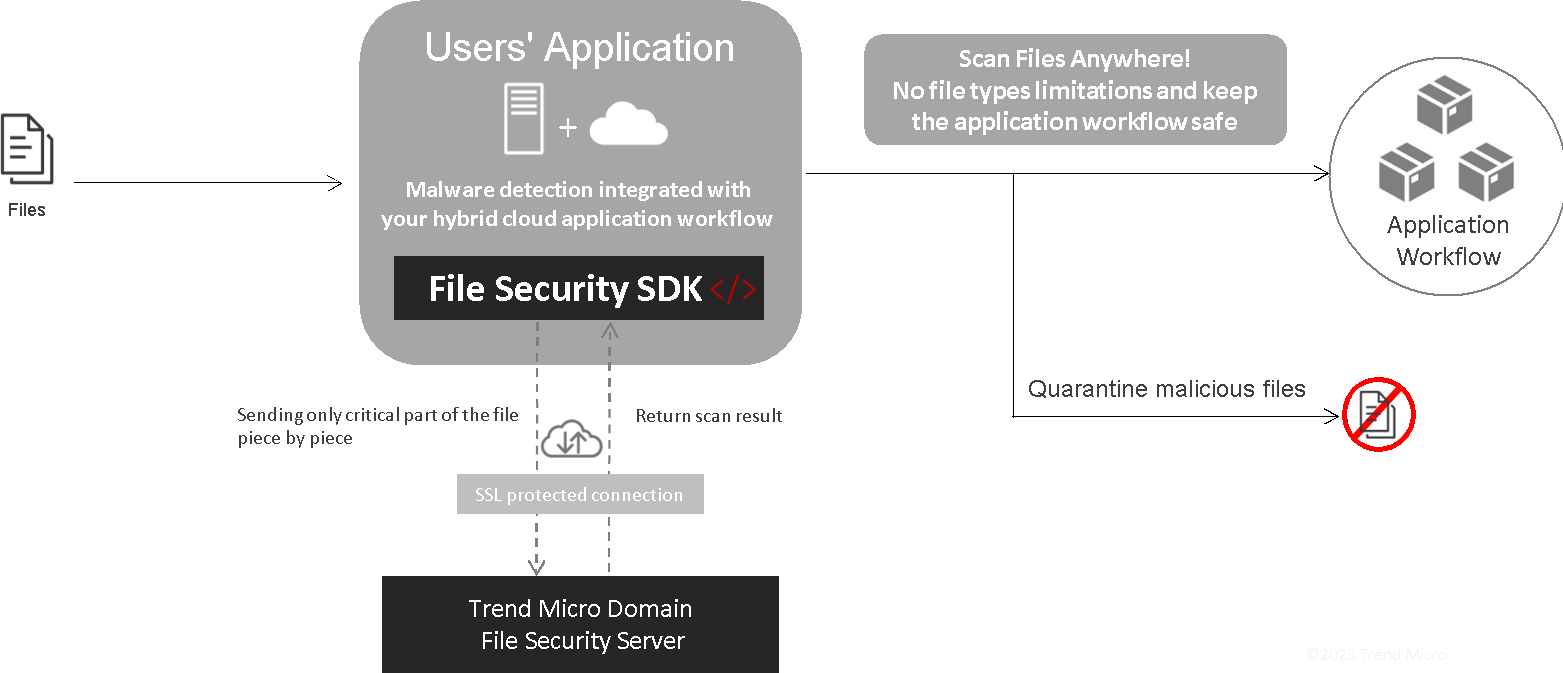
The following architecture diagram illustrates the main File Security SDK information
flow.
The following SDKs are available in GitHub:
The command-line interface
(CLI) is also available in GitHub.
When deciding which method is best for your organization, consider the following table.
SDK versus CLI
| Feature | SDK | CLI |
|
Scan any file type
|
✔
|
✔
|
|
Detect malware anywhere
|
✔
|
✔
|
|
Detect active content
|
✔
|
✔
|
|
Analyze any size file
|
✔
|
✔
|
|
Display real-time scan results
|
✔
|
✔
|
|
Examine on-premises applications, containers, clusters, and storage
|
✔ |
✔
|
|
Inspect cloud-based applications, containers, clusters, and storage
|
✔
|
✔
|
|
Program with one of four languages
|
✔
|
|
| Run without a program | ✔ |
Ensuring secure communication with TLS
The communication channel between the client program or SDK and the
TrendAI Vision One™™ File
Security service is fortified with robust server-side TLS encryption. This ensures
that all data
transmitted between the client and the Trend service remains thoroughly encrypted
and
safeguarded. The certificate employed by server-side TLS is a publicly-signed certificate
from
TrendAI™ Inc, issued by a trusted Certificate Authority (CA), further bolstering security
measures.
The File Security SDK consistently adopts TLS as the default communication channel,
prioritizing security at all times. TrendAI™ strongly advises you not to disable TLS in a
production environment while utilizing the File Security SDK, as doing so could compromise
the
integrity and confidentiality of transmitted data.