


Use the uninstall tool to remove TrendAI Vision One™ Endpoint Security agents from macOS endpoints.
TrendAI™ recommends using an mobile device manager software like Jamf Now to deploy the uninstall
tool. If you do not have access to an endpoint management software, you can run the
tool manually from the endpoint using Terminal.
 |
NoteMake sure your endpoint management software supports macOS deployment and is able
to run commands with root permission. For more information, review the support documentation
for Apple Platform Deployment on the Apple website.
If you are uninstalling manually, you must have root permission on the endpoint.
|
Procedure
- On the TrendAI Vision One™ for Service Providers console, go to .
- Click Agent Installer.
- Click the download the uninstall tool link at the bottom of the Agent Installer screen.
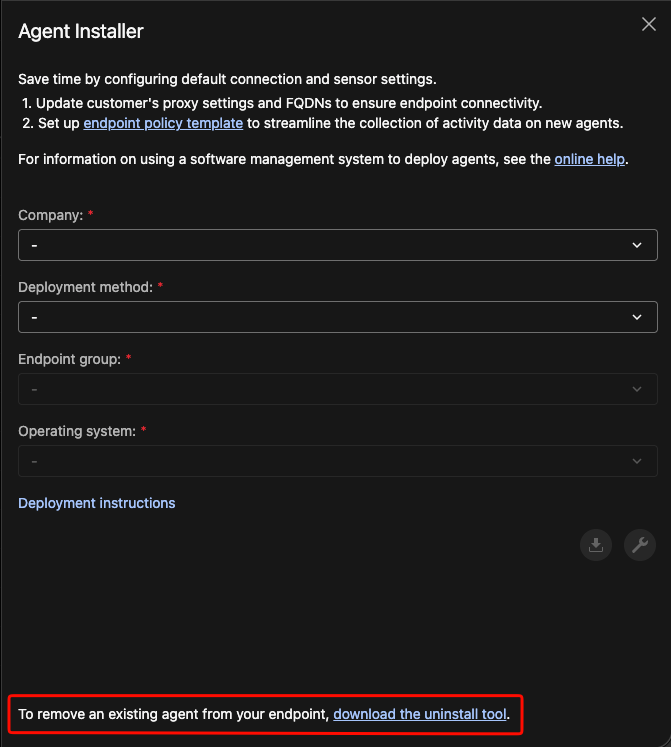
Note
If you do not see the link, you might not have permission to perform this action. Contact your system administrator. - In the Download Uninstall Tool screen, locate macOS and click the Download tool button.
Note
The downloaded uninstall tool expires after seven days. - Deploy the uninstall tool package to the target macOS endpoint and unzip the package.
- If you are uninstalling manually, open Terminal and navigate to the location of the tool.
- Run
V1ESUninstallTool.appwith the command sudo V1ESUninstallTool.app/Contents/MacOS/V1ESUninstallTool --[parameter].Target ProductParameterCommandDescriptionStandard Endpoint Protectionsepsudo V1ESUninstallTool.app/Contents/MacOS/V1ESUninstallTool --sepOnly uninstalls Standard Endpoint Protection featuresServer & Workload Protectionswpsudo V1ESUninstallTool.app/Contents/MacOS/V1ESUninstallTool --swpOnly uninstalls Server & Workload Protection featuresUninstall allallsudo V1ESUninstallTool.app/Contents/MacOS/V1ESUninstallTool --allUninstalls the TrendAI Vision One™ Endpoint Security agent and all related componentsThe uninstall tool supports using an alternate JWT file path if you have more than one valid JWT token. Use one of the following commands to specify the JWT file path:-
V1ESUninstallTool.app/Contents/MacOS/V1ESUninstallTool --[parameter] -j [jwt_token_file]
-
V1ESUninstallTool.app/Contents/MacOS/V1ESUninstallTool --[parameter] --jwt_file [jwt_token_file]
Replace[jwt_token_file]with the file path and JWT file name you want to use.For example, to remove all with an alternative JWT token: V1ESUninstallTool.app/Contents/MacOS/V1ESUninstallTool --all --jwt_file User/MyTokens/jwt.ioThe agent is uninstalled from the endpoint. Endpoint Inventory might take some time to update the information. -