


Learn how to register your application in NinjaOne and obtain the credentials required for integration with external services.
 |
ImportantThe following NinjaOne instructions were valid as of November 17, 2025. For further
help, check your NinjaOne documentation.
|
Procedure
- Sign in to NinjaOne.
- Go to .
- Click Add client app.
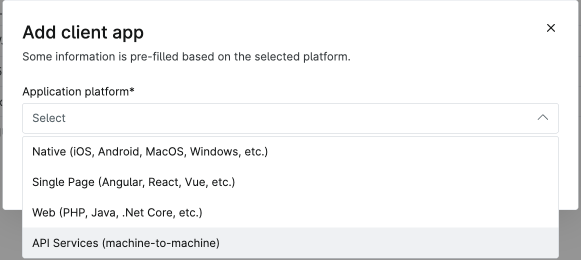
- Select API Services (machine-to-machine) from the Application platform drop-down list.
- Enter information about the integration application.
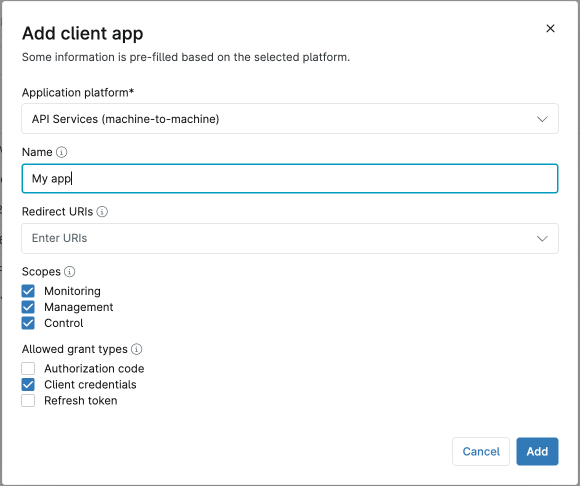 FieldSettingNameEnter the name for your application.Redirect URIsSpecify the URLs that NinjaOne can use to redirect users after authentication.Leave blank if the flow does not require user interaction.ScopesSelect the API resources your application can access. TrendAI™ recommends selecting all scopes.
-
Monitoring: grants read-only access to monitoring data and organization structure.
-
Management: allows modification of device and organization information; including creating new organizations, adding devices, running scripts.
-
Control: enables remote access via API.
Allowed Grant TypesDefine the authentication process for your application.Select Client Credentials for API services. -
- Click Save.
- Note down the generated Client ID and Client Secret and store these credentials securely. These credentials are crucial for authentication
and will not be visible again after closing the dialog.
Important
If you forget the Client Secret, you must generate a new one. Generating a new Client Secret removes all existing access, and you will need to update the integrated application with the new secret.