


Understand the new, simplified model for calculating credit usage.
Starting in January 2026, TrendAI Vision One™ for Service Providers has transitioned to a new monthly usage model, designed to ensure that your billing
reflects your managed customers' actual usage of TrendAI Vision One™ solutions and packages.
This simplified billing model helps support your operations by reducing the risk of
overpaying for temporary usage spikes, such as incident response, assessments, or
onboarding. By providing more predictable monthly costs, the model enables smoother
billing for better forecasting, budgeting, and margin planning. You can confidently
scale customers and services without having short-term increases raise costs, making
this model ideal for multi-tenant environments where usage naturally fluctuates across
customers.
Going forward, your billing is no longer based on your peak usage during the month.
For individual solution packages, there are two ways that TrendAI Vision One™ calculates credit usage, depending on the package—based on accumulated volume, or
on the 85th percentile of usage snapshots.
Volume-based calculation
Volume-based solution packages calculate credit usage based on each customer's cumulative usage
throughout the month. Your billing for the month is the sum of each day's usage that
month. As a result, your managed customers' estimated credit usage for volume-based
solution packages updates every day of the month as usage accumulates.
 |
TipYou can review and adjust your chargeable units for the previous month directly in
Usage Reports. The review window opens on the first calendar day of each month, and
its duration depends on your region:
This flexibility allows you to align with customer onboarding or offboarding, contract
changes, and internal billing reconciliation.
This feature is not available in all regions.
|
At the end of the month, your managed customers' total usage of volume-based solution
packages determines the final cost in credits.
 |
NoteTrendAI Vision One™ for Service Providers automatically calculates the final billed units for TrendAI Vision One™ solutions in units of 100 credits, called the TrendAI™ Flex xSP 100-Credit Pack. The system uses standard accounting rules to round credit pack
values to the nearest integer (for example, 32.49 rounds to 32, and 32.50 rounds to
33). Based on the number of credit packs billed for in the selected billing period,
your customers can receive a volume discount on the final invoice.
|
Snapshot-based calculation
For snapshot-based solution packages, TrendAI Vision One™ for Service Providers identifies the one day of the month occupying the 85th percentile position for usage,
and bills you based on your credit usage for that day alone.
TrendAI Vision One™ for Service Providers calculates snapshot-based monthly billing in the following way:
-
Calculate your daily usage for a given customer: TrendAI Vision One™ for Service Providers calculates your unit usage on each day of the month for a given managed customer.
-
Sort daily usage values: All daily unit usage values for the month are sorted from lowest to highest usage.
-
Identify the day in the 85th percentile position: TrendAI Vision One™ for Service Providers determines the day of the month occupying the 85th percentile position as follows:
Note
This calculation excludes the days with the highest 15% of usage as outliers, helping to prevent your monthly billing from spiking due to a one-off event.-
Take the number of days in the month.Example: 31 days in January
-
Multiply by 0.85.Example: 31 days * 0.85 = 26.35
-
Round up to the nearest whole number.Example: 26.35 rounds up to 27
-
Find the date in the sorted list occupying the resulting position.Example: Locate the 27th day in the ordered list.

Important
Note that the 27th day refers to the date occupying the 27th position in the ordered list, not the 27th of January. Any day in the month could occupy the 27th position, dependent on the amount of usage.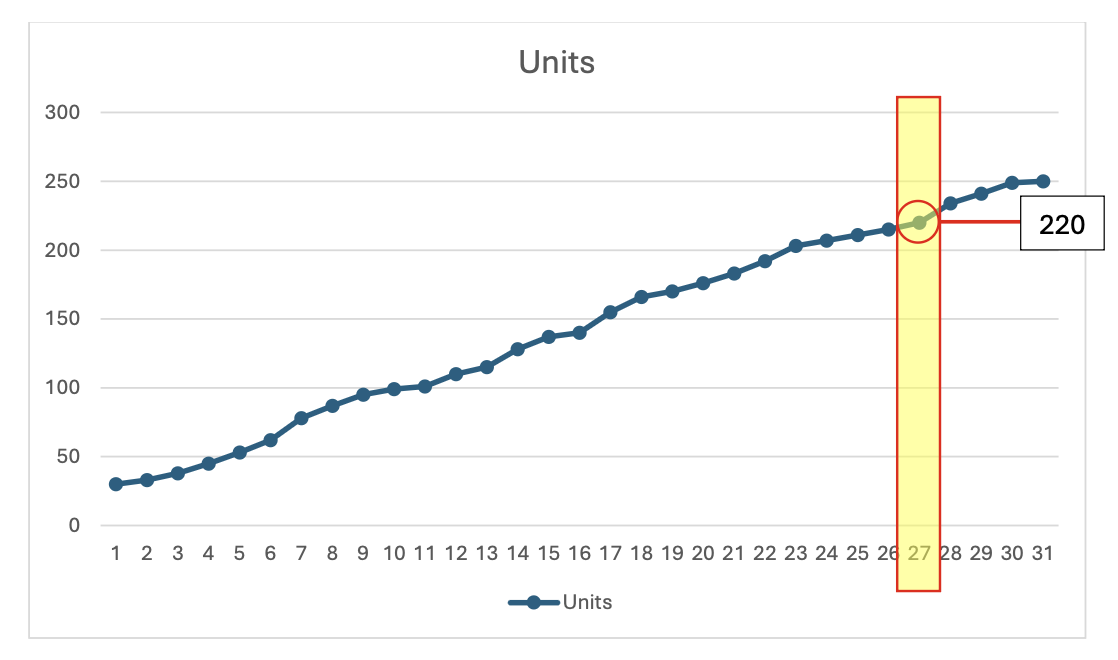
-
-
Calculate chargeable units for the managed customer: The unit usage on the day occupying the 85th percentile position becomes your monthly chargeable unit usage for that customer.Example: If your usage for a given managed customer was 220 units on that day, then your number of chargeable units for that customer in January is also 220.
Note
This chargeable unit calculation applies only to solution packages used during the month. -
Add up total monthly billing: Your total billing for the month is equal to the sum total of all your managed customers' chargeable units.
Tip
You can review and adjust your chargeable units for the previous month directly in Usage Reports. The review window opens on the first calendar day of each month, and its duration depends on your region:-
North America: days 1 to 5 (for example, adjust January usage from February 1 to February 5)
-
Europe: days 1 to 10 (for example, adjust January usage from February 1 to February 10)
This flexibility allows you to align with customer onboarding or offboarding, contract changes, and internal billing reconciliation.This feature is not available in all regions. -
-
Calculate the final credit requirement: The credits required depend on your final total chargeable units.
Note
TrendAI Vision One™ for Service Providers automatically calculates the final billed units for TrendAI Vision One™ solutions in units of 100 credits, called the TrendAI™ Flex xSP 100-Credit Pack. The system uses standard accounting rules to round credit pack values to the nearest integer (for example, 32.49 rounds to 32, and 32.50 rounds to 33). Based on the number of credit packs billed for in the selected billing period, your customers can receive a volume discount on the final invoice.