


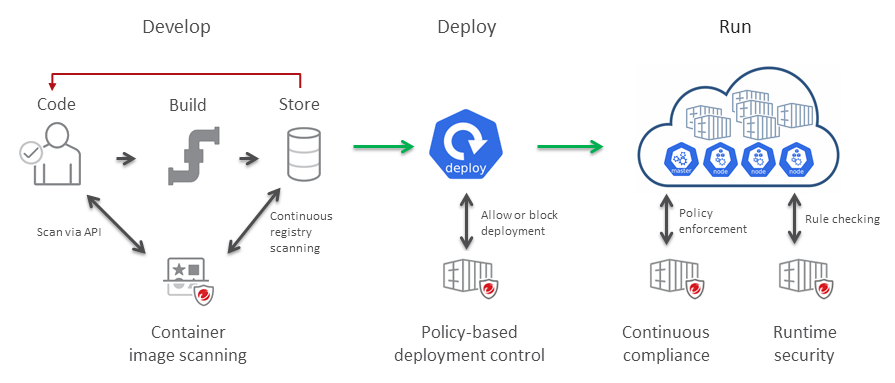
Security for your containers at all stages of their life cycle
- At deployment: Policy-based deployment control ensures that container images are run only when they meet the security criteria that you define.
- After deployment: Continuous compliance allows you to intermittently scan your containers after they are deployed.
- At runtime: Runtime behavior monitoring provides visibility into any container activity that violates a customizable set of rules.
|
Features
|
Descriptions
|
||
|
Container image scanning
|
Container image scanning, performed by the TrendAI™ Artifact Scanner (TMAS), enables you to scan container images as part of your development
pipeline and to perform ongoing scans of images in your registries so that developers
can detect and fix security issues early in the container image lifecycle. With container
image scanning, DevOps teams can continuously deliver production-ready applications
and meet the needs of your business, without impacting build cycles.
Container image scanning checks for vulnerabilities, malware, and secrets.
Container image scanning detects the following:
The results of the container image scans are sent to TrendAI Vision One™ - Container Security, which determines whether it is safe to deploy the image by
checking the scan results against a policy that you define.
To enable container image scanning, install the TrendAI™™ Artifact Scanner (TMAS) in your local environment.
|
||
|
Policy-based deployment control
|
Container Security provides policy-based deployment control through a native integration
with Kubernetes and Amazon ECS to ensure the deployments you run in your production
environment are safe.
Container Security enables you to create policies that allow or block deployments
based on
a set of rules. The rules are based on an object's properties and the results of TMAS
scans
(if you have TMAS integrated with your environment).
When an image is ready to be deployed with Kubernetes or Amazon ECS, the admission
control
webhook is triggered, which checks whether the image is safe to deploy and either
allows or
blocks it from running.
|
||
|
Continuous compliance
|
After deployment, Container Security can continue to monitor containers. Container
Security checks the policy assigned to the cluster on a regular basis, ensuring that
running
containers continue to conform to the policy you defined. If there are changes to
the policy
after the initial deployment, the updated policy is enforced. Running containers are
also
checked for new vulnerabilities as they are discovered.
|
||
|
Runtime behavior monitoring
|
Runtime behavior monitoring provides visibility into any activity of your running
containers that
violates a customizable set of rules. Currently, runtime behavior monitoring includes
a set of
predefined rules that provide visibility into MITRE ATT&CK® framework tactics for
containers, as well as container drift detection. Container Security can mitigate
problems
detected by the runtime visibility and control feature, based on a policy that you
define.
If a pod violates any rule during runtime, the issue is mitigated by terminating or
isolating the pod based on the runtime ruleset in the policy.
|
||
|
Runtime vulnerability assessment
|
Runtime vulnerability assessment provides visibility of operating system and open
source code vulnerabilities that are part of containers running in clusters where
you have Container Security installed. It provides a list of vulnerabilities, sorted
based on severity, which you can select for additional information. You can search
for a vulnerability by name, and filter by severity level or CVE score.
Vulnerability details include:
|
||
|
Runtime malware scan
|
Runtime malware scan provides detection of malware in your running containers, enabling
you to identify and respond to malware threats introduced after deployment. You can
configure a schedule to regularly scan for malware. Container Security logs malware
events, which you can view from the Events tab.
Runtime malware scan also provides mitigation for malware detections.
Terminate is available for Kubernetes and Amazon ECS.
Isolate is available only for Kubernetes. You can configure these options in
in the Policies tab.
For more information, see Managing Kubernetes protection
policies and Managing Amazon ECS policies.
|

