


TrendAI™ recommends using the default configuration for most security environments. To customize
the settings, use the following steps to configure the component update source:
Procedure
- Go to .
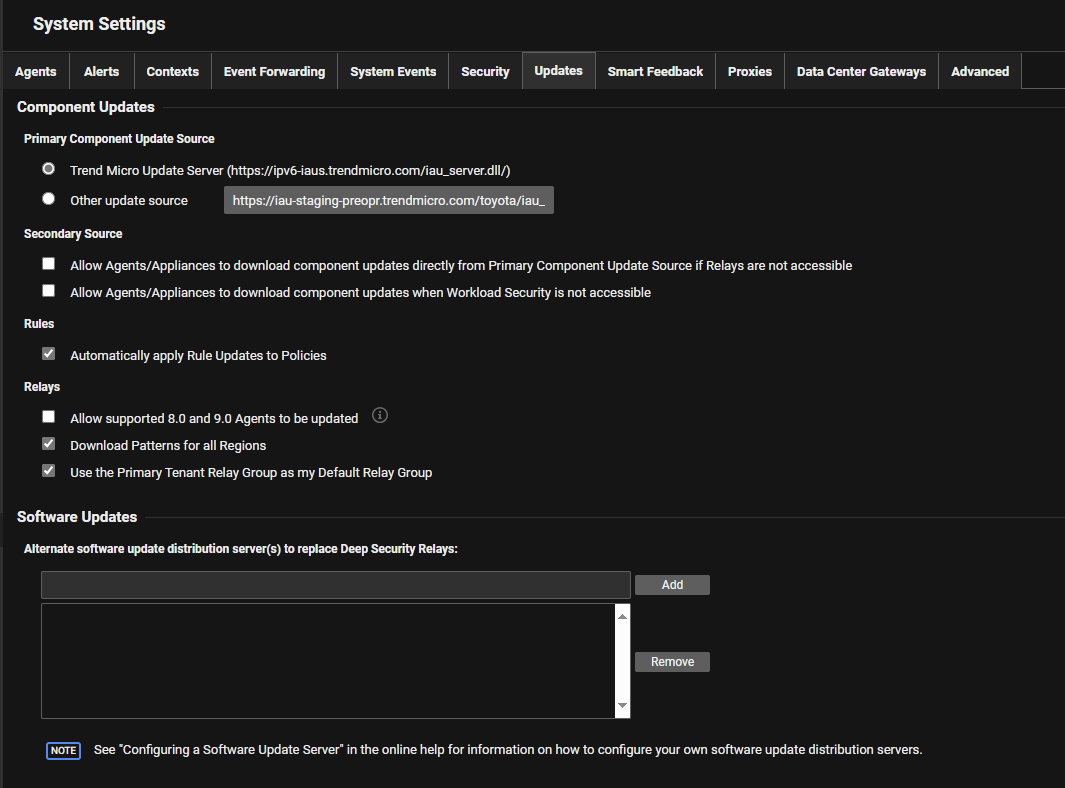
- Select an option for the Primary Component Update Source.The default primary source is Update Server, which agents access using the Internet. Do not select Other update source unless instructed by your support provider. Alternative update source URLs must include
http://orhttps://. - Configure the Secondary Source for component updates. Usually, agents connect to a relay to obtain component updates
when Server & Workload Protection tells them to. But if your computers can't always connect with Server & Workload Protection or relays (such as during scheduled maintenance times) and enough Internet/WAN bandwidth is available, these options are useful:Agents normally connect to a relay to retrieve component updates depending on your Server & Workload Protection configurations. Select the following options to retrieve component updates if agents are unable to connect to your relays or Server & Workload Protection.
-
Allow Agents/Appliances to download component updates directly from Primary Component Update Source if Relays are not accessible
-
Allow Agents/Appliances to download component updates when Workload Security Manager is not accessible

Tip
TrendAI™ recommends not enabling Secondary Source options for protected laptops and portable computers to avoid potential issues when updating components while away from support services. -
- Select Automatically apply Rule Updates to Policies to ensure existing security rules apply the updates to assigned policies.