


Procedure
- Select Set Scan Option from the left side bar.
- Click on the main menu.
- Under Excluded file extension list, click
Add. The Add Program File
Extension dialog box appears.
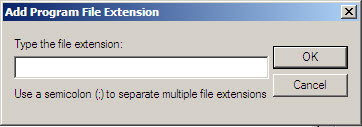
Add Program File Extension dialog - Type the file extensions that you want to exclude from being scanned. You can add multiple file extension separated by a semicolon (;).
- Click OK.
- To delete a previously typed file extension, select the file name from the Excluded file extension list, and then click Remove.
- Click Apply.