


Use the Quarantine database to schedule ScanMail to delete quarantine items older
than the specified number of days automatically. This feature is especially useful
if a Domino server handles a large amount of traffic.
 |
NoteScanMail automatically deletes quarantine items enabled for deletion.
|
To automatically delete quarantined items from Mail Scan and Database Scan:
-
Do one of the following to open the Quarantine database:
-
From the Configuration database left menu, click Quarantine Database.
-
Open
smquar.nsf.
-
-
From the Quarantine Database left menu, click .
-
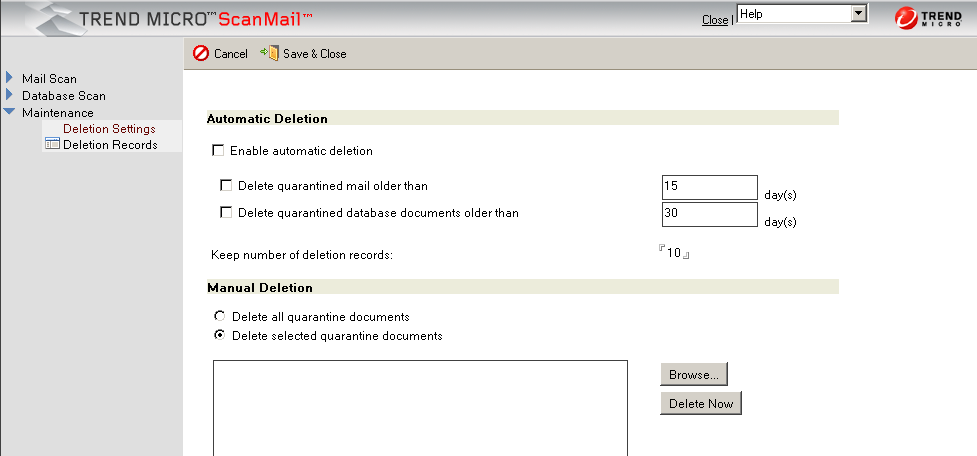
Select Enable automatic deletion; then, choose from the following:
-
Select Delete quarantined mail older than, and type the number of days that ScanMail will keep mail before it is deleted.
-
Select Delete quarantined database documents older than, and type the number of days that ScanMail will keep database documents before they are deleted.
-
-
In the Keep number of deletion records field, type then number of deletion records (0-100) that ScanMail will keep in the Deletion Records folder.
Note
Deleted Mail Scan and Database Scans are kept in the Deletion Records folder according to the number of deletion records set to keep in Maintenance > Deletion Settings >Keep number of deletion records.
-
Click Save & Close.