


Trend Micro provides all
registered users with technical support, malware pattern downloads, and program
updates for a specified period after which you must purchase renewal maintenance to
continue receiving these services. Register Mobile Security server to ensure that you are eligible to receive the latest
security updates and other product and maintenance services.
You only need to register Mobile Security server on the Management Server using the
Activation Code. Mobile Device Agents automatically obtain license information from
the Mobile Security server after the mobile
devices are connected and registered to the server.
An activation code displays in the following format:
xx-xxxx-xxxxx-xxxxx-xxxxx-xxxxx-xxxxx
Procedure
- Log on to the Mobile Security administration web console.
- Type the Activation Code in the fields provided and click
Save.
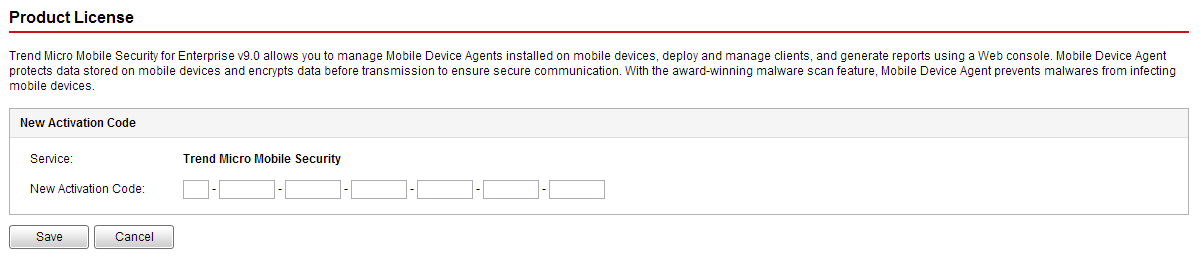
Registering Mobile Security after installation - Verify that product registration is successful. Click to display the Dashboard screen.You should see the message
Trend Micro Mobile Security 9.8 SP5 Critical Patch 6 has been activated.
if product registration is successful.After the registration is complete, the Mobile Security Configuration and Verification screen displays and guides you through the steps to complete the initial settings.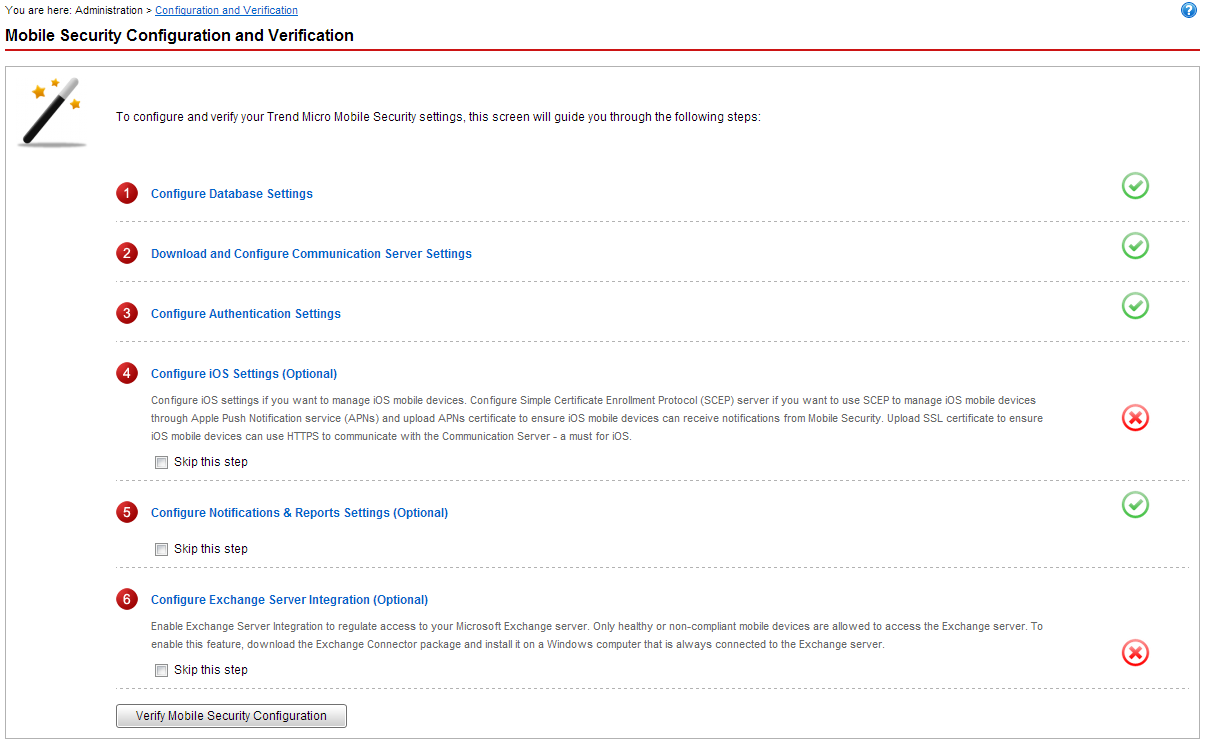
Mobile Security Configuration and Verification screen