

A Group Administrator can define whether the Full Disk Encryption preboot
appears before Windows starts. If the parent group allows Yes and
No, then the subgroup Group Authenticators have the right to set the range to
Yes and No, just Yes, or just
No. If the parent group has set the range to either
Yes or No, then the subgroup Group Administrator can
only select that same range.
Procedure
- Right-click the policy to be modified and then click Properties.
- Specify policy options.
-
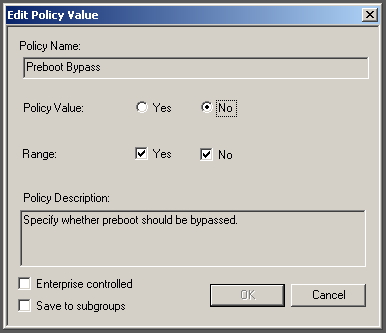
The Policy Value field sets whether the policy is turned on.
-
The Range field sets whether the policy is available to other users or groups.Example: if the policy is set to No, then the policy will not be available to set to Yes.

Note
Removing an option from Policy Range removes the value from the Policy Value drop-down in the current group and all subgroups. -
- Click OK to save changes.The policy change is activated once the Endpoint Encryption agent synchronizes with PolicyServer.