

Some policies have multiple options stored in
subpolicies affecting that policy. Multiple option policies create separate lines
in a text string,
and each new line in the string is a subpolicy. For example, the IF Found policy
displays how to return a found device. A normal address format displays the name,
street address,
and city/state/zip on three separate lines.
 |
NoteDepending on the policy, multiple options is generally limited to six subpolicies.
|
Procedure
- Right-click the policy to modify and then click Add.
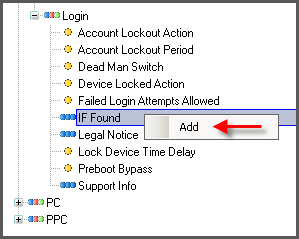
If Found Policy: Adding a New Option - Specify details in the Policy Value field.
Note
Depending on the policy, you may need to modify the added policy by right-clicking and selecting Properties. - Click OK to save changes.

If Found Policy: Results After Adding Multiple Options - If needed, add a new option.
- To make changes, right-click the child policy, then select
Properties.The policy change is activated once the Endpoint Encryption agent synchronizes with PolicyServer.