

Procedure
- Go to Dashboard.
- Select the tab to which you want to add a widget.
- Click the settings icon (
 ) in the upper-right corner of the tab
selected on the dashboard.The Settings menu opens where the Add Widgets setting displays.
) in the upper-right corner of the tab
selected on the dashboard.The Settings menu opens where the Add Widgets setting displays.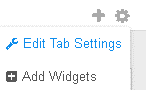
- Select Add Widgets and then select one or more widgets from the widget list by selecting the check box next to the widget's title.
- Click Add.After adding a widget, you can drag-and-drop the widget to various locations within the tab.