

Procedure
- Go to .
- Set the detection severity level by dragging the Detection severity slider.
- Select a time period.
- To select columns for display, click Customize Columns,
select one or more columns, then click Apply to return to
the modified All Detections screen.
All Detections Columns
ColumnsPreselectedStatusXTimestampXSource HostXDestination HostXInterested HostXPeer HostSenderRecipientsEmail SubjectUser AccountThreat DescriptionXDetection NameXThreat (Virtual Analyzer)ReferenceDetection TypeProtocolXTransport Layer Security (TLS)Detection SeverityXAttack PhaseXDirectionNotable ObjectX
Note
The default Timestamp and Threat Description columns cannot be removed.The default Details column cannot not be removed and does not appear in the Customize Columns option. - (Optional) Click Mark Displayed as Resolved to mark all
the detections displayed on the current page as resolved.In the Status column, the
 icon changes to
  .
.Note
After marking all displayed detections as resolved, detections can only be individually marked as unresolved. - To run a basic search, do one of the following:
-
Type an IP address or host name in the search text box and press Enter.
-
Click the
 icon.
icon.
By default, Deep Discovery Inspector searches All Detections by Source Host, Destination Host, and Interested Host.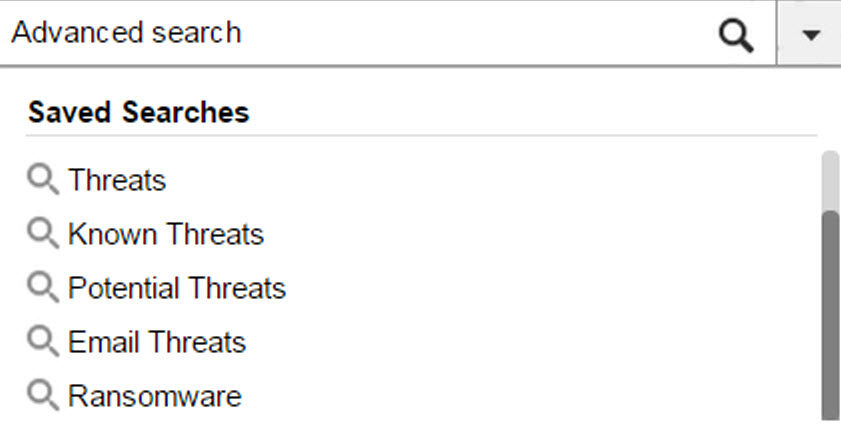
All Detections Basic Search -
- To run a saved search, go to Detections>All
Detections, open the drop-down menu of the search box, and click
a saved search.Deep Discovery Inspector provides the following preset saved searches.
Preset Saved Searches
NameFilter OptionsThreatsDetection type options include the following:-
Malicious Content
-
Malicious Behavior
-
Suspicious Behavior
-
Exploit
-
Grayware
-
Malicious URL
Known ThreatsFile Detection Types: Known MalwarePotential Threats- Virtual Analyzer Result: Has analysis results
-
File Detection type options include the following:
-
Highly Suspicious File
-
Heuristic Detection
-
Email ThreatsProtocol options include the following:-
IMAP4
-
POP3
-
SMTP
RansomwareDetection name options include the following:-
Ransomware-related detections
-
- To create and apply an advanced search filter, click
Advanced.For details, see All detections advanced search filter.
- Click Export.A zip folder with the following files downloads:
-
threats.csv
-
malicious_urls.csv
-
application_filters.csv
-
correlated_incidents.csv
-