


The Security Agent Console Flyover opens when you hover your mouse pointer over
the small icon on the bottom right of the Security Agent console.
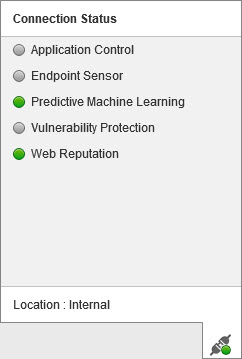
The following table lists the Console Flyover icons and their
meanings:
Console Flyover Icons
|
Feature
|
Icon
|
Meaning
|
|
Feature configuration
|
 |
At least one feature is enabled
|
 |
No features are enabled
|
|
|
Application Control
|
 |
On
|
 |
Lockdown: Only applications installed during the last inventory scan or that
the administrator added to an Allowed rule can execute
|
|
 |
Off
|
|
|
|
On
|
|
Off
|