


Gain increased visibility into the relationships between and attributes of your devices by integrating ServiceNow CMDB with TrendAI Vision One™.
 |
ImportantThis is a "Pre-release" feature and is not considered an official release. Please
review the
Pre-release disclaimer
before using the feature.
|
The Cyber Risk Exposure Management for ServiceNow CMDB integration gives you access
to your device information, including attributes and relationships, and device web
activity logs within TrendAI Vision One™ to provide actionable risk insights. To integrate ServiceNow CMDB data, you must
configure the integration in the ServiceNow console.
 |
NoteThe following instructions were valid as of October 20, 2025.
|
To configure the ServiceNow CMDB integration, you need:
-
The TrendAI Vision One™ connector from the ServiceNow store
-
A dedicated web service access-only ServiceNow service account with the following roles:
-
cmdb_read
-
snc_platform_rest_api_access
-
Procedure
- In the TrendAI Vision One™ console, go to .
- Locate and click the Cyber Risk Exposure Management for ServiceNow CMDB card.
- Generate, copy, and save the authentication token.
- Use the authentication token copied from the TrendAI Vision One™ to configure the integration in the ServiceNow console.
- In the filter navigator, type TrendAI Vision One™ Connector and go to Properties.
- In the CMDB settings, add the TrendAI Vision One™ API authentication token you previously copied.
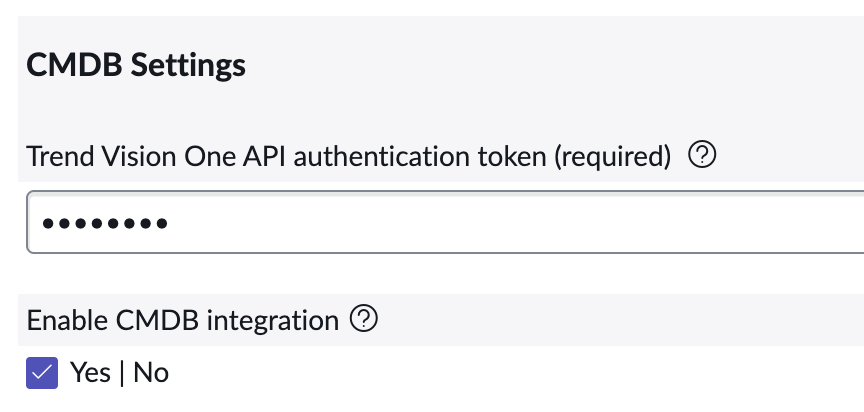
- Enable CMDB integration.
- Click Save.
- Check the data sync status in Data Source and Log Management. If the authentication token has expired, generate a new token and reconfigure the integration in the ServiceNow console.