


If you updated from TrendAI™ Apex One as a Service or Cloud One - Endpoint & Workload Security, review your endpoint
groups to ensure everything looks as expected. You can manage your Standard Endpoint
Protection and Server & Workload Protection groups using the Endpoint Inventory screen.
 |
NoteEndpoints which have deployed Endpoint Sensor only and are not managed by a
Protection Manager cannot be added to groups. You can use the Add
filters (
 ) button and search field to locate endpoints by
parameters such as agent policy, device type, operating system, and more. ) button and search field to locate endpoints by
parameters such as agent policy, device type, operating system, and more. |
Procedure
- For Standard Endpoint Protection agents:
- Go to .
- In the Endpoint Management section to the left of the list, expand your Standard Endpoint Protection Management instance.
- Beside your Endpoint Group Manager (previous TrendAI™ Apex One server), click the options icon and Create a group.
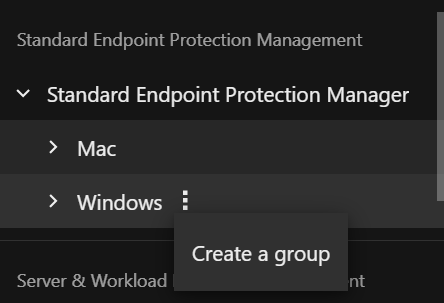
- Specify a group name and where to add the new group in the tree.
- Click Create.You can also review and move agents to other groups managed by the same Endpoint Group Manager. For more information, see Endpoint Inventory.
- For Server & Workload Protection agents:
- Go to .
- In the Endpoint Management section to the left of the list, expand your Server & Workload Protection Management instances.
- Expand Computers, click the options icon next to any existing group and Create a group.
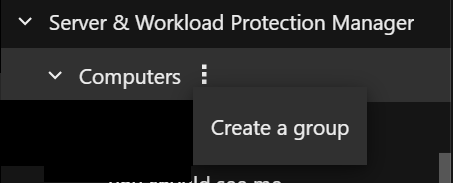
- Specify a group name and where to add the new group in the tree.
- Click Create.You can also review and move agents to other groups managed by the same Server & Workload Manager instance. For more information, see Endpoint Inventory.