TrendAI Vision One™ File Security offers file-scanning using virtual appliances through the
TrendAI Vision One™ Service Gateway. The File Security Virtual Appliance acts a local scanner on your
on-premises servers or your AWS EC2 instances behind your firewall. Your files never
leave your system; only metadata is returned to TrendAI™.
You can add the Virtual Appliance from either the
TrendAI Vision One™ Service Gateway app or
TrendAI Vision One™ File Security. After deploying the File Security Virtual Appliance into a corporate
data center or private cloud environment, you add mount points to your servers using
the File Security UI console and have target files on storage servers scanned automatically.
Alternatively, you can adopt the File Security SDK to send file metadata to the File
Security Virtual Appliance for scanning. In both scenarios, no files leave your corporate
boundary.
Virtual appliances can have multiple servers, and servers can have multiple mount
points. You enable scanning on the mount points. When you enable scanning for a mount
point, it scans all of the files in the selected folder. It continues to monitor the
folder and scans any files that are added to, or modified in, the folder.
When you add your mount points, you have the option of enabling Predictive Machine
Learning and suspicious file quarantining.
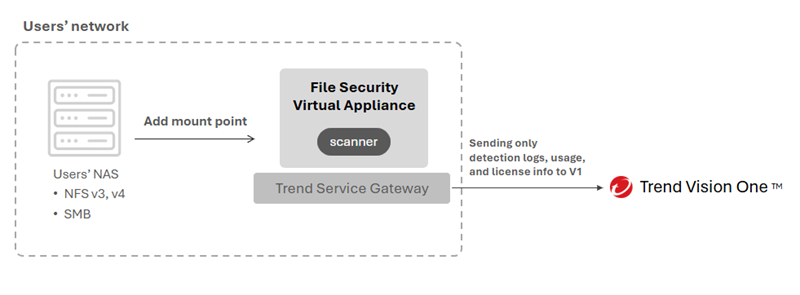
The following architecture diagram illustrates the main File Security Virtual Appliance
information flow.