


Apply attack prevention/detection rules from TrendAI™ products to vulnerable assets in Cyber Risk Exposure Management in to mitigate specific vulnerabilities and reduce risk.
When remediation options such as patches and updates are not available for vulnerable
assets, you can apply attack prevention/detection rules from TrendAI™ products and solutions to mitigate the vulnerability. Applying endpoint-based attack
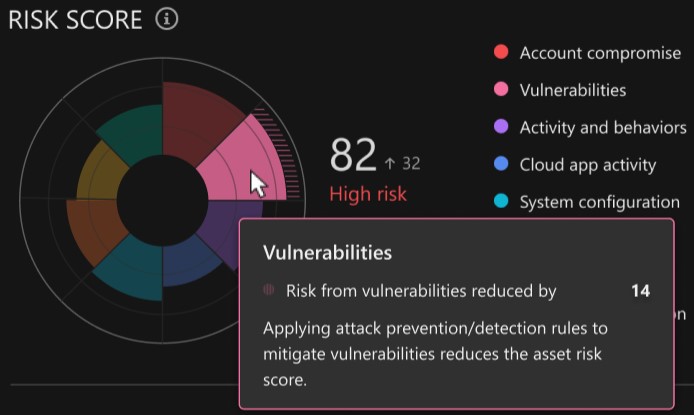
prevention/detection rules also lowers the asset risk score. Asset risk score reduction
from endpoint-based attack prevention/detection rules is visible on the radar chart
on the asset profile screen. The hashed area of the vulnerabilities section represents
the amount the risk score has been reduced.
 |
NoteOnly endpoint-based attack prevention/detection rules currently affect the asset risk
score.
|
Specific attack prevention/detection rules are available based on your connected TrendAI™ endpoint and network protection products or TrendAI Vision One™ solutions, including:
-
Cloud One - Endpoint & Workload Security
-
Apex One
-
Deep Security
-
Standard Endpoint Protection
-
Server & Workload Protection
-
TippingPoint
-
Worry-Free Services
When viewing detected vulnerabilities in the Risk Assessment tab on an asset profile screen, the icon next to the detection data source indicates
the attack prevention/detection rule status.
-
No indicator: No attack prevention/detection rules are currently available for this vulnerability
-
Not mitigated (
 ): Attack prevention/detection rules are available for this vulnerability, but the
rules have not been applied to the asset
): Attack prevention/detection rules are available for this vulnerability, but the
rules have not been applied to the asset -
Partially mitigated (
 ): Only some available attack prevention/detection rules have been applied to the
asset, or only network-based attack prevention/detection rules have been applied
): Only some available attack prevention/detection rules have been applied to the
asset, or only network-based attack prevention/detection rules have been applied -
Mitigated (
 ): All available attack prevention/detection rules have been applied to the asset
 |
ImportantNetwork-based attack prevention-detection rules can only protect assets when they
are connected to the protected network segment. If an asset disconnects from or otherwise
leaves the network segment, network-based solutions can no longer protect the asset.
If you cannot patch the asset, TrendAI™ recommends applying endpoint-based attack prevention/detection rules in addition
to network-based rules in order to ensure the asset is protected. Assets with only
network-based rules applied cannot be considered fully mitigated and will not experience
a risk score reduction.
|
To see whether attack prevention/detection rules are available for a vulnerable asset,
go to the asset profile screen and filter the displayed risk events by new vulnerabilities.
Vulnerabilities with available attack prevention/detection rules display a mitigation
status indicator. Expand the risk event details to view available mitigation options.
Click View vulnerability mitigation details or click the mitigation status indicator to view a list of available attack prevention/detection
rules by product or solution.
The following table details the information available in the Vulnerability mitigation details for an asset.
|
Information
|
Details
|
|
Overall protection status
|
Whether the asset is protected by available attack prevention/detection rules and
when the rules were applied
|
|
Available protection solutions
|
Available TrendAI™ products and solutions with applicable attack prevention/detection rules, divided
into endpoint and network-based solutions
|
|
Available attack prevention/detection rules
|
Available rules from each product or solution, listed by filter rule ID
|
 ) indicates the rule has been applied
 ) indicates the rule has not been applied
Once attack prevention/detection rules are applied to the asset, the status of associated
vulnerability risk events automatically changes to mitigated ( ).
).
).