Contents
Search
Search Knowledge Base
Collapse All
Expand All
Previous
Next
Search
Toggle Highlight
Launch a New Instance via Amazon EC2 with the IAM-enabled Role
Procedure
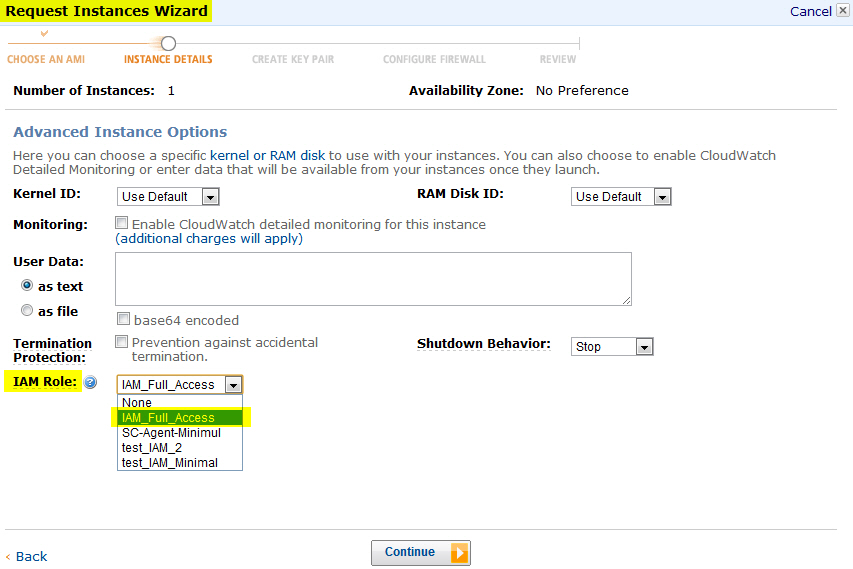
From the Amazon management console, switch to
AWS EC2
.
Launch a new instance and select a suitable
IAM Role
.
Connect to the instance, and then
install SecureCloud agent
.
Run the Configuration Tool
to provision a device.
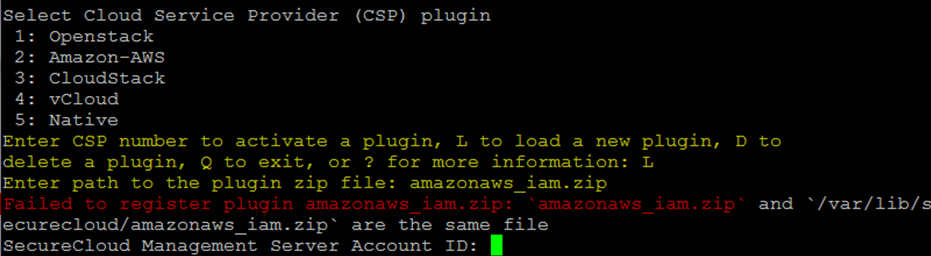
Type
L
and
amazonaws_iam.zip
at the
Enter CSP number
prompt.
Important
Ignore the error
Failed to register plugin amazonaws_iam.zip
.
Related information
SecureCloud on Amazon AWS Identity and Access Management (IAM)