Create within your CSP the data storage
devices for the RAID.
Configure the Runtime Agent in order to publish the data
storage device in your CSP environment.
With the update inventory
option set to yes, configuring the Runtime Agent
will make the devices in your CSP environment available in SecureCloud.
The device status must be set to Encrypted before
you can use it.
Procedure
On the SecureCloud web console > Inventory > Devices page,
click .
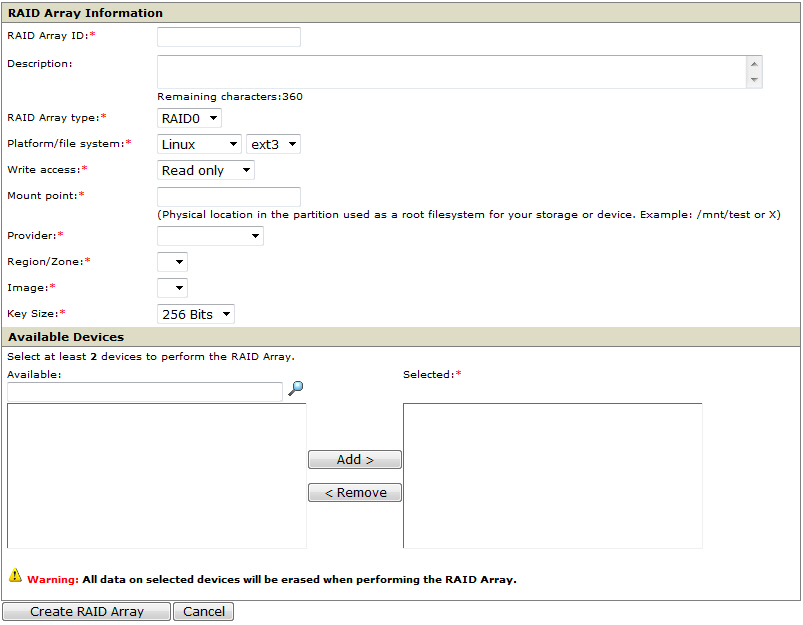
The RAID Array Information page
opens.
From the RAID Array Information area,
specify all the necessary information for the RAID.
RAID Array ID—any unique name that does not
contain any special characters (!@#$()%^&*+)
Description—
RAID Array type—
Platform/file system—
Write access—
Mount point—the drive letter you map to the RAID
Provider—
Region/Zone—
Image—the machine image accessing the RAID
Key Size—the block size used in encryption (either 128,
192, or 256-bits)
The Provider, Region/Zone, and Image determine which device
will be available for selection in the Available Devices area.
From the Available Devices area,
select the data storage devices you want to add to the RAID. You
must select at least two devices.
Tip
Trend Micro recommends using the same
device size for each device in a RAID group.
At the bottom of the page, click Create RAID
Array.


 .
.