

Set Policy Action for Key Requests Parent topic

Procedure

  1. Specify the action for pending keys requests when a policy is triggered.
    • Approve—SecureCloud approves the key request automatically at encryption key request time.
    • Manually Approve—SecureCloud sets the key request status to Pending in the Running Instances page.
      In this case, you will have the option to either approve or deny a key to access the secure data storage.
      SecureCloud enables policy_action_manual_approval.jpg, which allows you to specify a time when automatic approval will occur if no manual approval happens.
    • Deny—pending key request is denied; encrypted device will not be created.
    SecureCloud provides an option to specify a time when automatic approval will occur if no manual approval is taken.
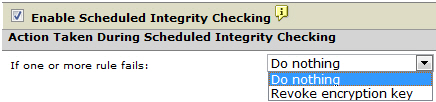
  2. Decide if you want to enable scheduled Integrity Checking.
    With this feature enabled, SecureCloud invokes routine integrity check on the cloud environment based on the schedule set. See Schedule an Integrity Check for instructions.
    integrity_check_enable.jpg

    Enabling Scheduled Integrity Checking

    If Revoke encryption key is selected in Action Taken During Scheduled Integrity Checking, specify the amount of time (grace period) that can pass before SecureCloud revokes the key.
    WARNING
    WARNING
    If Postpone revoke for X [period] is disabled, the encryption key will be revoked immediately upon policy violation.

    integrity_check_postpong_revoke.jpg
  3. Click Save or Apply to continue working in the previous page.