
The Control Manager management console is a Web-based console published on the Internet/Intranet through the Microsoft Internet Information Server (IIS) and hosted by the Control Manager server. It lets you administer the Control Manager network from any machine using a compatible Web browser.
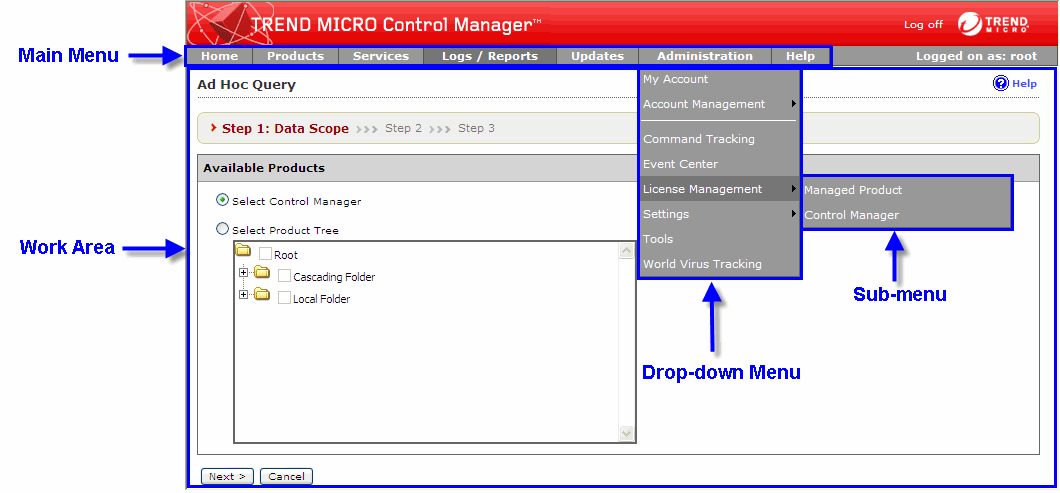
The management console consists of the following elements:
The management console main menu includes links to the following Control Manager functions:
Home: Provides an at a glance summary of your network and includes shortcuts to detailed information screens
Products: Includes options to administer Managed Products, Communicators, and Child servers
Services: Includes TrendLabs Message Board posts and available services
Logs/Reports: Includes options to manage Control Manager managed products and child server logs and reports
Updates: Provides options for configuring manual and scheduled updates
Administration: Includes the Command Tracking, Event Center, User Manager, System Settings, and Tools options
The drop down menus for each Main menu item appear after mousing over the specified item. Only the following menu items have drop down menus: Logs/Reports, Updates, Administration, and Help.
Use the work area to manage the Control Manager network. Here you can administer Managed Products or child server settings, invoke tasks, or view system status, logs, and reports.
View the management console at a screen resolution of 1024 x 768 pixels.