Synchronizing Time for both Registered MFA Device and SecureCloud Server Parent topic

If you are unable to log on to the SecureCloud web console using one of your active MFA backup codes, a possible reason could be a time difference between your registered MFA device and the SecureCloud server’s clock. Follow the steps below to synchronize the clock on your device.

Procedure

  1. Prepare your registered MFA device.
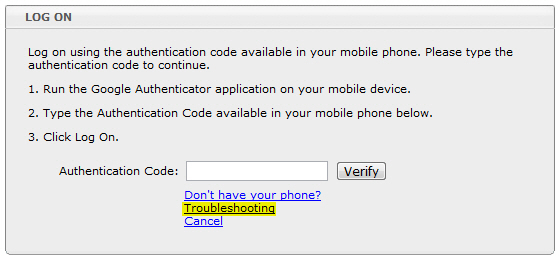
  2. On the MFA Logon page, click Troubleshooting.
    mfa_troubleshooting_sync.jpg
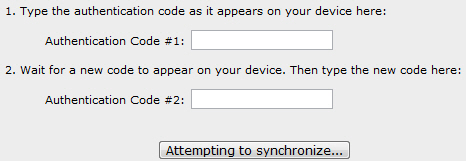
  3. On the Troubleshooting page, type the authentication codes supplied by your registered device, and then click Attempting to synchronize....
    mfa_sync.jpg
After following these steps, you should be able to use any of your active MFA backup codes to log on to the SecureCloud web console.