Specifying Device Configuration Information Parent topic

If you did not wait for provisioning to complete when running the Configuration Tool, you will not be able be able to encrypt these devices with Not Configured status from the Web Console, but you can still configure the device. For any data storage device with the status of Available you are able to specify or change the device name, description, and mount point.
This task allows an Image Identity to be mapped with your target encrypted device.

Procedure

  1. From Inventory > Devices page, click the link of the desired device with a Not Configured status.
    The Edit Device page opens.
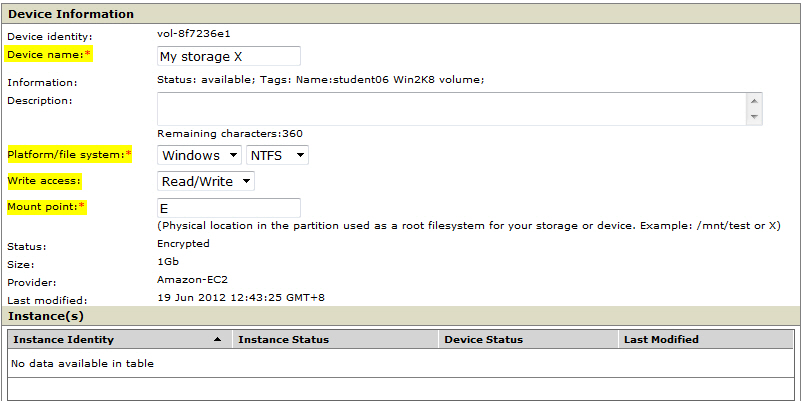
  2. Specify the properties of your target encrypted device.
    device_edit1.jpg

    Device Information

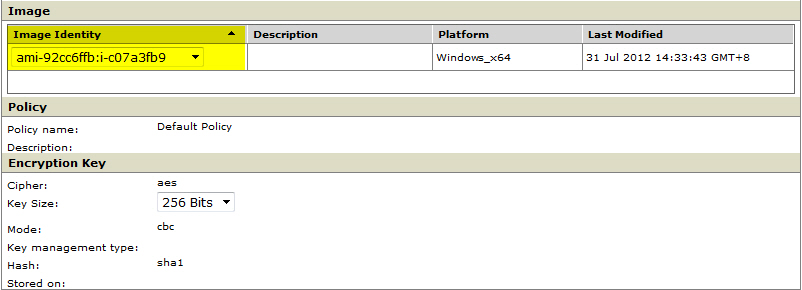
  3. Select the desired machine image from the drop-down list in the Image Identity column.
    device_edit2.jpg

    Device Information

  4. Click Save.
    The Devices page reloads with the status of your device set to Configured.
  5. Select the newly configured drive, and then click Encrypt.
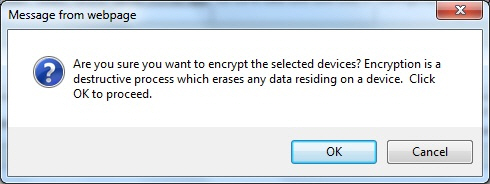
    Confirm the encryption:
    device_encrypt_confirm.jpg
    Wait until the state changes:
    Encryption PendingEncryptingEncrypted
    Click Refresh to monitor the encryption status.
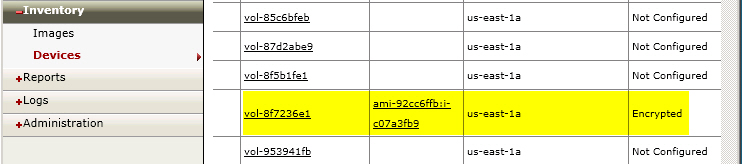
device_encrypted_status.jpg

The Inventory > Devices page lists the newly encrypted storage device.