The Network Packet
Capturing wizard is located at . Use the captured network packet to perform traffic debug or analysis.
Use Network Packet Capture to choose a single or multiple network interfaces on which
to
simultaneously capture network packet. After the capture starts, the elapsed time
displays. The
capture operation stops when the Administrator clicks Stop capture or when
the configured time or size criteria is met.
The packet capture for each interface will be save in an individual file using the
naming
convention of “capture-{interface}-{date:time}.pcap”. For example
capture-eth0-2012-02-17.1329518492.75.pcap.tar.gz would be the file name
for the packet capture on the eth0 network interface performed on February 17, 2012.
After the network packet capture completes, all packet capture files are saved in
one
compressed package file named to “capture-{date}.tgz”. This file displays in
the downloadable list. Administrators can either download or deleted the compressed
file.
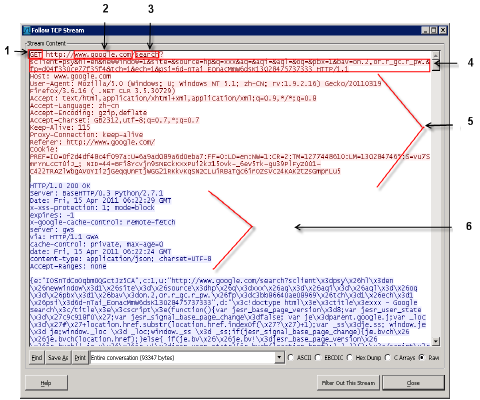
Packet capture for a Google search
Components shows in the packet capture
| 1 |
Request method |
| 2 |
URL host |
| 3 |
URL path |
| 4 |
URL query |
| 5 |
Request header |
| 6 |
Response header |